Try Weglot for free


Translation converts text from one language to another. Localization adapts the entire user experience to feel native to a specific culture and region. This important difference includes adapting content, design, payment methods, and user experience elements for local audiences.
Industry research shows that localized websites can deliver major conversion-rate uplifts. Localization is one of the few investments with a low upfront cost compared to the size of the gains made.
This guide will show you how to improve the user experience for your target markets through website localization, and make your foreign market entry as smooth as possible.
Localization opens doors to new revenue streams by making your website accessible to non-English speaking audiences. It builds trust and credibility with local customers who prefer buying from sites that speak their language.
According to CSA Research, 76% of online shoppers prefer to buy products with information in their native language, and 40% will never purchase from websites in other languages. Those staying monolingual are effectively closing the door on great numbers of international customers.
For a detailed breakdown of these benefits with real-world examples and case studies, see our complete guide to website localization benefits.
A localization strategy is a plan for adapting your marketing, products, and services to match the needs of a specific target audience. It covers every touchpoint you’ll have with your readers, from website content to customer support.
Follow these 11 steps to get your own campaign up and running:
Market research will tell you the languages your target audience speaks, the colloquial language and slang they use, cultural and social norms, relevant local figures, and cultural references. Integrating this into your messaging demonstrates that you’re knowledgeable about the local scene.
Let’s take a look at Coca-Cola’s global website compared to their Australian site:


Their global website delivers a general message that works across all markets. However, the Australian website features a localized approach, using imagery – like bottles of Coca-Cola cooled by ice on sand – to align with the local culture. This simple change connects their product with the everyday experiences of their audience, demonstrating the importance of cultural context in localization.
Put simply, the goal of website localization is to enter new markets effectively. Without deep market research to understand local audience preferences, your brand might come across as unfamiliar or disconnected from the local market.
Netflix offers a strong example of successful localization in India. Instead of translating existing content, they conducted extensive research to create original, region-specific shows and movies. They also adapted their marketing campaigns, pricing strategies, and payment options to meet the unique needs of their Indian audience.

Similarly, Airbnb tailored its platform by focusing on cultural preferences and local regulations in each market. They ensured the website featured local payment methods, was available in multiple languages, and showcased region-specific accommodations. This research-driven approach allowed them to build trust and connect with local users around the globe.
A localization team manages the adaptation of content across languages and cultures. Website localization can be notoriously complex, and putting together the right team will improve your workflow.
An example team could include linguists or translators, developers, designers, localization managers, QA engineers, and marketers. Here’s how the roles break down:
However, not everyone can afford to assemble a localization team, especially if you don’t have the numbers to confirm your potential for international growth.
That’s where a website translation tool like Weglot is worth its weight in gold. By using Weglot, you can localize your entire website for a fraction of the time and money you would spend on a traditional localization team.

Learn more about Weglot and how it can be implemented in your website localization strategy.
Website internationalization is the process of ensuring your website is technically ready to host and display the proper translated content to your target audience.
It involves more than fully translating your website into your target audience’s preferred language. For example, it involves correctly displaying naming conventions, currencies, and date formats.
Here’s what you need to consider when internationalizing your website:
The URL structure of your website plays a major role in site localization. The right URL structure for your website tells search engines like Google to present that site to a specific audience in a specific country, enabling you to target them effectively.
Here are common URL structures to choose from:
Each structure has its pros and cons, so it’s important to choose one that aligns with your website localization strategy.

Hreflang Tags
Adding hreflang tags to your source code is indispensable to internationalizing your website. They’re HTML attributes that search engines use to determine the geographic area and language the page is intended for. They look like this:
<link rel="alternate" hreflang="en" href="https://www.abc.com/" />Try searching for "Nike official website" in the UK. The first result will bring you to https://www.nike.com/gb/.
Correct hreflang tagging is essential to ensure that Spanish speakers are served Spanish pages, and not the native language pages from your English site.
Localization must account for legal requirements that vary by region. GDPR compliance is mandatory for websites targeting European users, requiring proper consent mechanisms and data handling practices.
Many countries have specific accessibility standards, such as Web Content Accessibility Guidelines (WCAG), that localized sites should meet. Local regulations around privacy, cookies, and consumer protection may also affect how you present content to users in different markets.
According to Nimdzi, 9 out of 10 international internet users will ignore your product if it isn’t in their local language, and this counts even for bilingual speakers. But what’s the best way to translate your website content, and how can you ensure your site copy is as natural in your original language as in your target language?
There are three types of translation methods to consider:
Machine translation uses algorithms to automatically convert text between languages. This method allows you to translate your site without needing human intervention. It’s quick, though results may vary in accuracy depending on the language pair and content type.
Leading AI translation providers include Google Translate, DeepL, and Microsoft, which provide high-quality translation output. AI language models like ChatGPT can also translate website content, and potentially deliver a more human-like output.
AI translation is rapidly improving, making it a powerful option for companies looking to scale quickly. However, for brands looking to connect with customers on a deeper, more personal level, AI translation may require a human touch to ensure quality.
Human translation involves professional linguists manually translating content. Also known as manual translation, this method offers highly accurate and contextually appropriate results, often performed by a native speaker. The result is content that reads naturally and connects with the local audience.
While it can be time-consuming and costly, human translation is the go-to option for industries where precise, culturally aware language is critical – think legal contracts, medical documentation, or luxury branding.
For businesses prioritizing authentic customer engagement over speed, human translation can make the difference between a generic message and a culturally compelling one.
Hybrid translation combines machine speed with human quality control. Here, you’ll have the best of both worlds. This is often done by using a first layer of premium AI translation and then having a human edit the output until it reaches the desired level of accuracy.
Companies like Airbnb and Booking.com have perfected this method, using AI translation to handle vast volumes of content while human linguists fine-tune critical pieces like property descriptions and customer support FAQs. The result is a more localized experience for users across different languages – the highest level of quality, only with much reduced timescales than human translation alone.
Weglot is the perfect example of hybrid translation. Learn more about how Weglot works and try for free – you’ll get 2,000 words translated instantly into one language, and all your SEO taken care of. What’s more, you can also enjoy a 14-day free trial on any of our pricing tiers, with no credit card needed.
Alongside the actual words on your site, you’ll need to pay particular attention to other website UX and UI factors:
Cultural adaptation is the process of adjusting content to match local values, preferences, and customs. When entering new markets, cultural nuances play a major role in how your brand is perceived.
What connects with one culture may feel alien to another. Understanding local traditions, values, and preferences ensures your message connects with the audience in the right way.
McDonald’s, for example, offers a vegetarian menu in India featuring items like the McAloo Tikki burger, which is tailored to local tastes.

Facebook provides an excellent example of UI adaptation. For left-to-right languages like English, German, and Indonesian, they use their standard layout:

For Arabic users, they completely flip their design to accommodate RTL reading patterns:

Clarins adapts their imagery for different markets. The French version features a Caucasian woman, while the Japanese version showcases women of East Asian descent:

But on the Japanese version of the site, the women featured are clearly of East Asian descent, resonating with the website visitors.

Alongside image choice, adjust design elements to meet the specific needs of each language. Here are some best practices:
A Translation Management System (TMS) is a platform that centralizes and automates localization workflows. A good TMS can manage large volumes of content efficiently, helping automate repetitive translation tasks and making it easier to manage updates across multiple language versions of your website.
You don’t need to hire a developer to localize your website. Tech-free tools like Weglot let you translate and manage your multilingual site without touching code. These platforms handle the technical setup, making localization accessible to businesses without dedicated development resources.
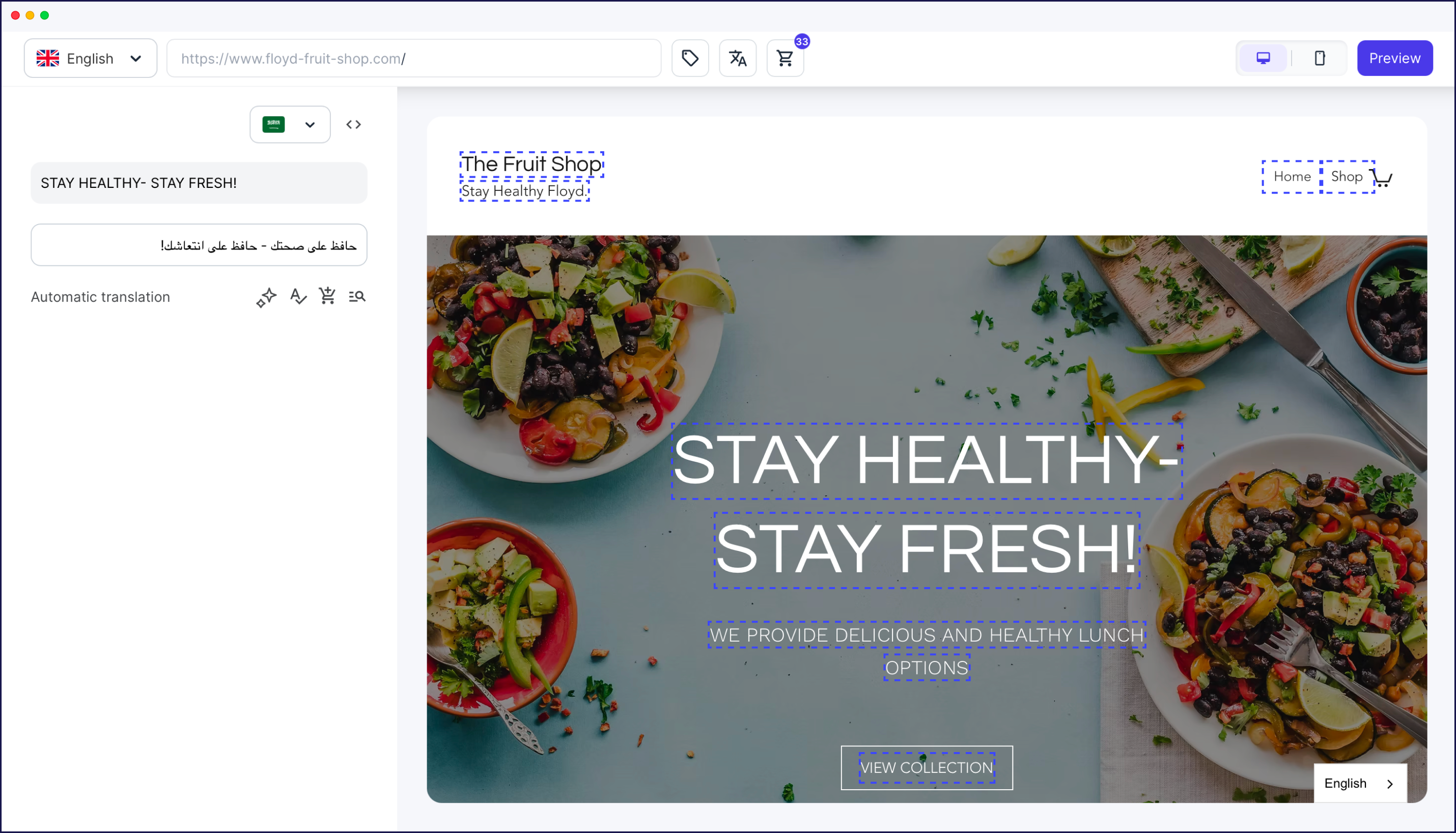
For example, Weglot detects and translates website content automatically, including dynamic elements like metadata. This reduces the risk of human error, ensuring nothing gets missed in translation. In-context translation tools, such as Weglot’s frontend Visual Editor, let you edit live previews of your website, simplifying localization.
For a more granular approach to localization, Computer-Assisted Translation (CAT) tools offer features like Translation Memory (TM) and terminology management. These tools help translators ensure consistency by suggesting translations for repeated terms, speeding up the process and reducing costs.
Translation memory stores previously translated content for reuse across projects. This means the same phrases don’t need to be retranslated. Terminology management tools store approved brand terms and definitions.
Glossaries can be created to manage brand-specific terminology, ensuring that certain words, such as product names or technical terms, are consistently translated the same way across all content. This feature is especially useful for websites with highly technical content or specialized jargon.
Localization quality assurance tools help ensure that translated content is free from errors and that it maintains the original intent of the message. These tools automatically scan for issues such as missing translations, formatting errors, and even cultural inconsistencies.
Software like Xbench or Verifika are designed to detect potential problems, ensuring that your final localized content is polished and professional. By incorporating quality checks into your localization process, you minimize the risk of launching incomplete or incorrect translations, which could damage your brand’s reputation in new markets.
International SEO (also called SEO localization) is the practice of optimizing localized content for search engines in target markets. Once you’ve translated your site, the next step is to consider keyword research and search engine optimization.
Understanding what keywords your audience is searching for will improve your global rankings. This is why like-for-like website translation cannot always work and where international keyword research plays a role.
To optimize for each market, conduct international keyword research tailored to your audience’s specific search intent. This involves:
For example, as AS Marketing’s Leigh Buttrey explained during the International Marketing Summit, their campaigns in Norway shifted to focus on Norwegian keywords despite lower search volumes. This allowed them to stand out in a competitive landscape because the localized keywords built trust with their audience, resulting in higher conversion rates than campaigns using English keywords.

The process looks something like this: identify your keywords, translate your keywords, localize your translated keywords, then check the viability of your localized keywords.
Localization testing verifies that translated content displays correctly and functions as intended. To ensure a great user experience across different regions, functional testing is essential.
This process involves verifying that all localized elements, such as language settings, currency conversion, and region-specific functionalities like payment methods, work correctly.
For example, Shopify, a major ecommerce platform, has localized its UI for different markets by adapting features such as currency conversion, shipping options, and payment methods to reflect local needs. These changes have greatly improved the user experience, allowing customers to shop comfortably in their preferred language and currency.
For digital products and platforms, offering local customer support and help centers is another best practice. Slack provides multilingual support across different time zones to ensure users get quick assistance in their native language. This focus on localized support, alongside their user-friendly interface, ensures a great experience regardless of the user’s location.
When localizing your website, watch out for these common pitfalls:
Launching a localized website requires careful coordination across multiple regions.
A staggered or phased approach can help reduce the risk of technical issues during launch. When Amazon enters a new market, they localize not only their website but also logistics and support services, ensuring that the launch is adapted to regional expectations. Your launch plan should account for different time zones, server demands, and localized marketing efforts to create a smooth entry into each market.
Once your localized site is live, monitoring its performance is the priority for ensuring long-term success. Track metrics like bounce rates, conversion rates, and time spent on the site to gauge the effectiveness of your localization strategy.
In addition, gathering feedback from users in different regions will help you identify areas for improvement. Tools like Google Analytics can provide insights into user behavior by region, allowing you to make data-driven adjustments for each market.
Localization ROI measures the financial return from adapting content for international markets. To track the success of your localization efforts, set clear KPIs. Here are the metrics to measure:
Traffic and rankings Measure organic traffic growth from target regions using Google Analytics. Track how your site ranks for local keywords using tools like Ahrefs or SEMrush. An increase in visitors from specific countries indicates your localized site is resonating.
Conversion rates Analyze conversion rates (purchases, sign-ups) from each region to assess how well your localized content drives user action. Compare conversion rate per region and average transaction size in localized markets.
Engagement metrics Monitor bounce rates and time on site for localized pages. High bounce rates may signal cultural or linguistic disconnect. Measure engagement through social shares, comments, and interactions specific to localized content.
Technical quality Track localization-related errors such as broken links, missing translations, or formatting issues that may affect the user experience. Regular audits help catch problems early.
Revenue impact Measure sales growth from localized regions and compare it with your localization investment to determine ROI. Track revenue and Average Order Value (AOV) from specific regions, plus growth in sales post-localization.
Customer satisfaction Use surveys and feedback to gauge how satisfied local customers are with your site. Monitor customer satisfaction scores (CSAT) by region and feedback from customer support.
Continuous improvement Localization is ongoing. Refine your strategy based on data and user feedback for long-term success. Track iterations and updates based on regional performance and improvement in engagement over time.
Website localization doesn't need to be scary. With the right tools by your side, the process can be a lot quicker and more efficient than you thought. Weglot is more than just a way of translating content – it’s your gateway to connect with global audiences.
With Weglot as your website localization tool, you can enter new non-English international markets and scale faster.
Thanks to its automation, you can say goodbye to manual work and juggling Excel sheets. Weglot helps you with website localization through easy website translation management, automatic content detection, and localization.
And the best part? You don’t necessarily have to burn a hole in your pocket or hire expensive linguists. All you need is the URL of your website to get started!
See how quickly you can launch a fully localized experience for your international visitors with a 14‑day Weglot free trial – on any pricing tier, and with no credit card required.
But we’re not done yet! Here’s some important further reading to help you take your website localization strategy one step ahead:


Trusted by 70,000+ global brands


Reach new audiences in minutes without sacrificing your team’s time. Anyone can install it.


