

Try Weglot for free


Full disclosure: This blog post is part of a series of articles aiming to help users get the most out of the WordPress Multilingual Plugin (WPML). By giving a realistic and neutral analysis, we hope to help our readers see for themselves whether WPML is the best tool for their website or whether an alternative plugin like Weglot would be more suitable.
When you’re creating a multilingual WordPress website, you need a very reliable translation tool. And while having many translation plugins available is technically a good thing, it can also make it difficult to make the right choice.
In this article, we’ll go deep into two of the most popular translation plugins – the WordPress Multilingual Plugin (WPML) and Weglot. We’ll go into their pros and cons and compare their most important features.
By the end, you’ll have a good idea of how these plugins might fit into the future of your website and how to choose the best possible option for your business.

WPML is a plugin that helps WordPress users manage the automatic or manual translation of website content into 65 languages.
WPML presents several features that make it a reliable translation tool:
Sounds great, right? However, WPML isn’t without its downsides. For example, to unlock its full potential, you need to use multiple separate plugins, which could potentially complicate the setup process and lead to issues of compatibility.
Another aspect that might not sit well with some users is the cost associated with machine translations, which are dictated by the purchase of credits (we’ll go into more detail on that later). This could inflate the overall expenses for sites with substantial content translation needs.
Finally, although WPML offers an option for automatic translation, it's not as smooth sailing as it initially might seem. You need to manually set it for every page and post unless the "Translate Everything Automatically" mode is activated. A challenge like this can put some users off, especially those who manage websites with a large amount of pages and data to translate.
While WPML offers a powerful translation solution for WordPress, several factors commonly lead website owners and agencies to explore alternatives:
For teams looking for a plugin that addresses these challenges, alternatives like Weglot offer a different approach to multilingual website management.
Weglot 2.0 builds on the Weglot you know: a translation plugin for WordPress whose AI translations sound like your brand from the start, with a redesigned dashboard and Visual Editor to manage them and multilingual SEO foundations on every page. The intuitive interface and wide language support make it a worthy competitor to WPML, even for non-tech users. The result is a brand that reads as unmistakably yours in every language and market, managed from one connected workflow.
Understanding the differences between Weglot and WPML is crucial to picking the plugin that will suit you best. While both plugins perform the primary task of serving multilingual websites, they differ significantly in terms of usability, translation scope, SEO capabilities, and pricing strategies.
Let’s take a look.
| Feature | Weglot | WPML |
|---|---|---|
| Ease of Use | Features a user-friendly interface and a simple setup process. | Takes a while to set up, and it can be hard to get the API working. |
| Translation Capabilities | Detects all your content and translates your entire site with AI translations written in your brand voice, including newly added pages and content. | Supports autotranslation, but you need to send manual commands for each piece of content through your WPML interface. |
| Multilingual SEO Features | Built-in multilingual SEO tools ensure your site is well-indexed in all working languages. | Supports rich SEO translations but with necessary manual initiation. |
| Pricing | Offers a free plan and tiered pricing plans for varying needs. | Begins with a yearly plan and offers a lifetime plan. |
| Compatibility | Compatible with multiple website platforms. | Compatible with only WordPress. |
Arguably, one of the most significant factors when selecting a translation plugin is its ease of use. An intuitive and streamlined setup can make all the difference in the efficiency and smoothness of your website translation process.
Weglot has been designed to automate every stage of the translation workflow and is designed for simplicity.
A great example of this simplicity is the setup process:
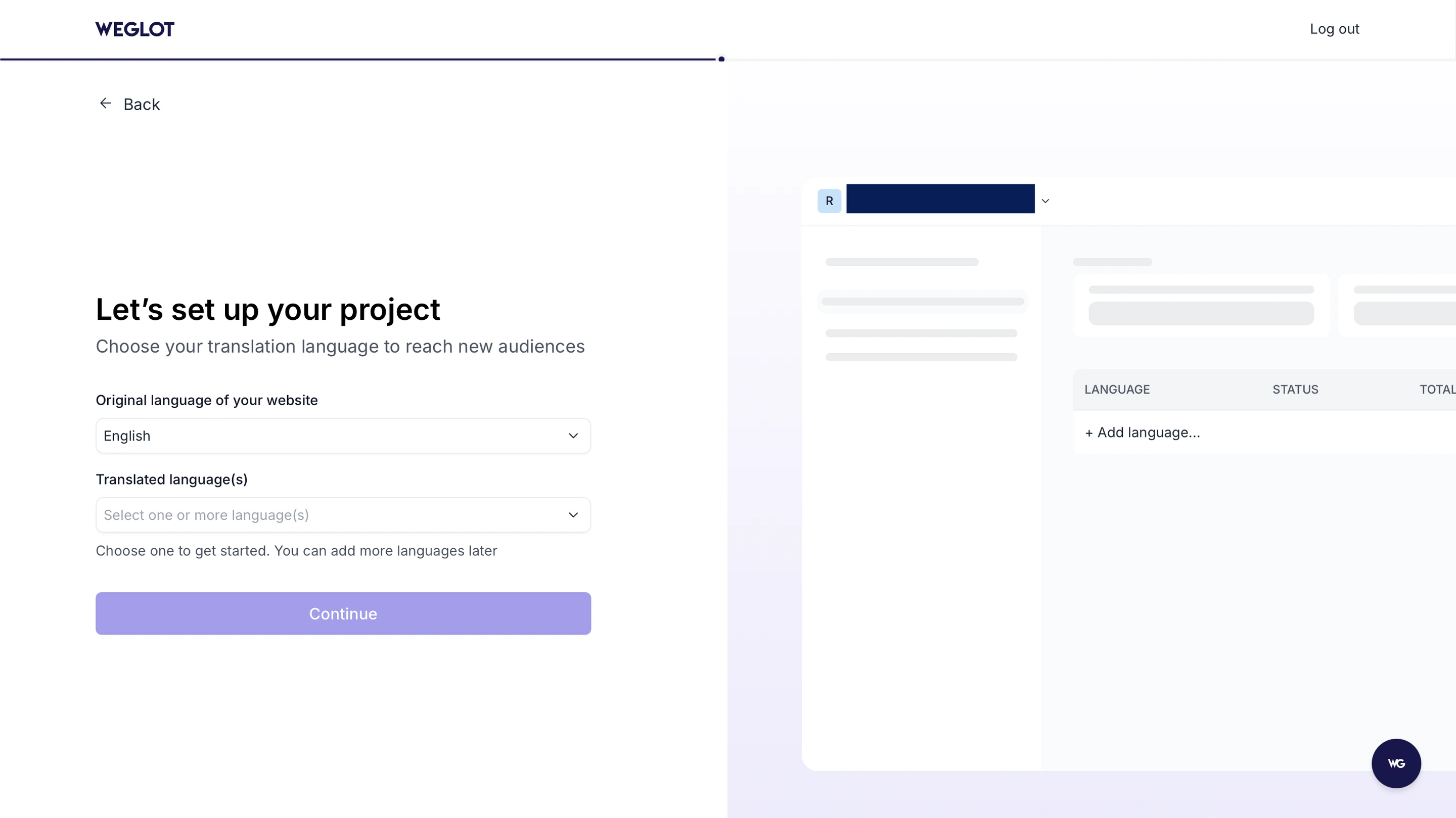
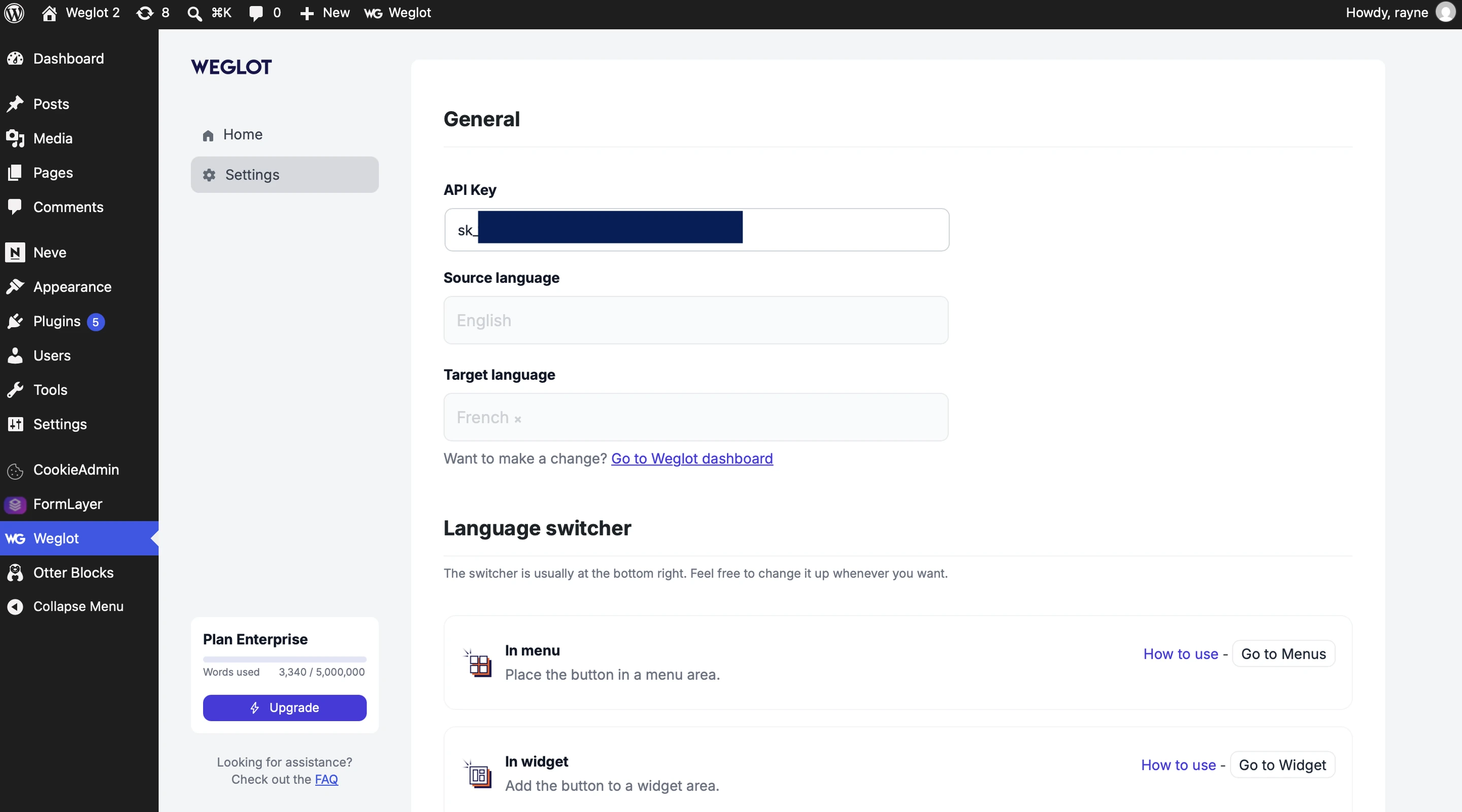
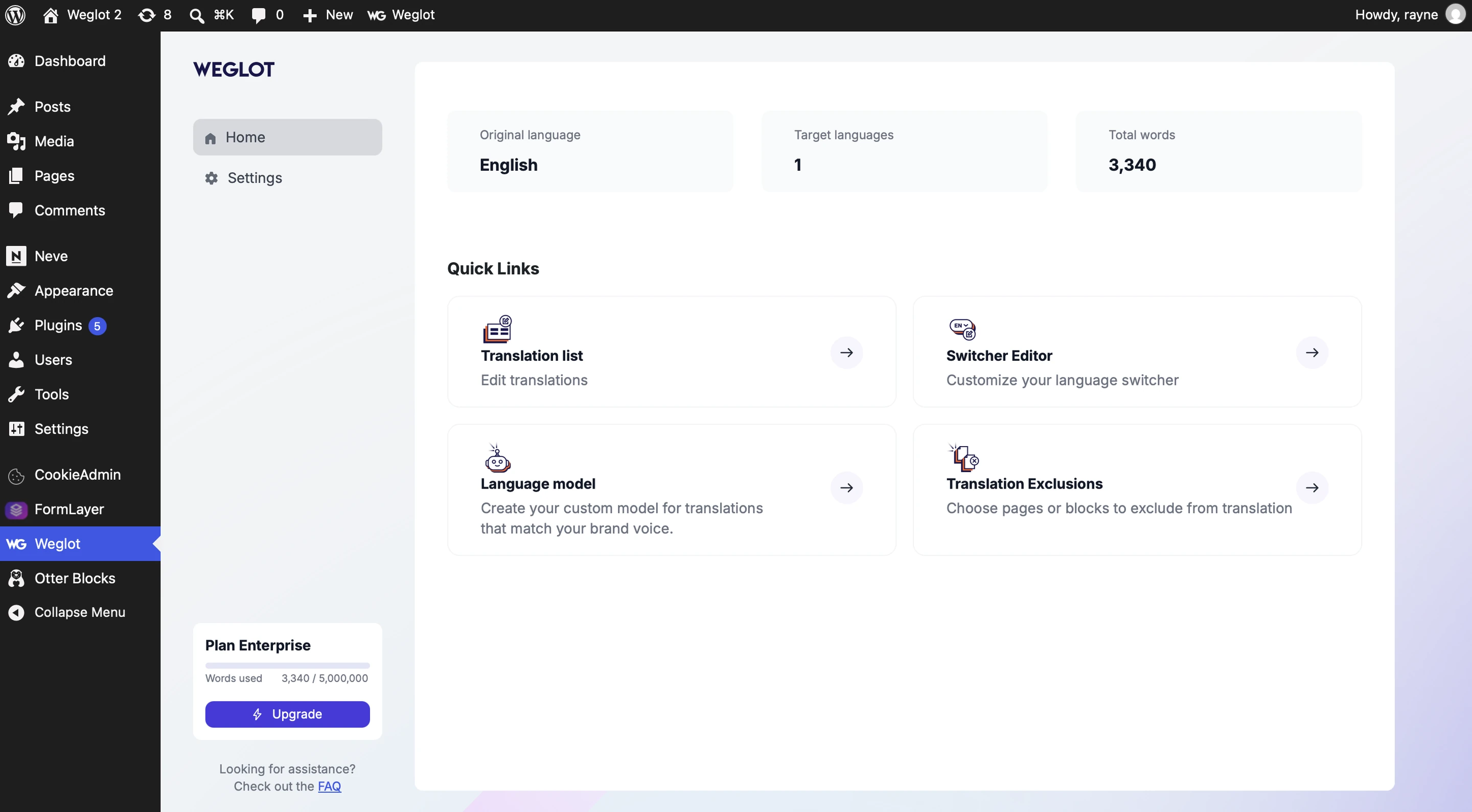
Alongside simple setup, managing translations with Weglot is also straightforward. All translations are centrally housed in the redesigned Weglot dashboard, where users can manage each language and collaborate with team members.
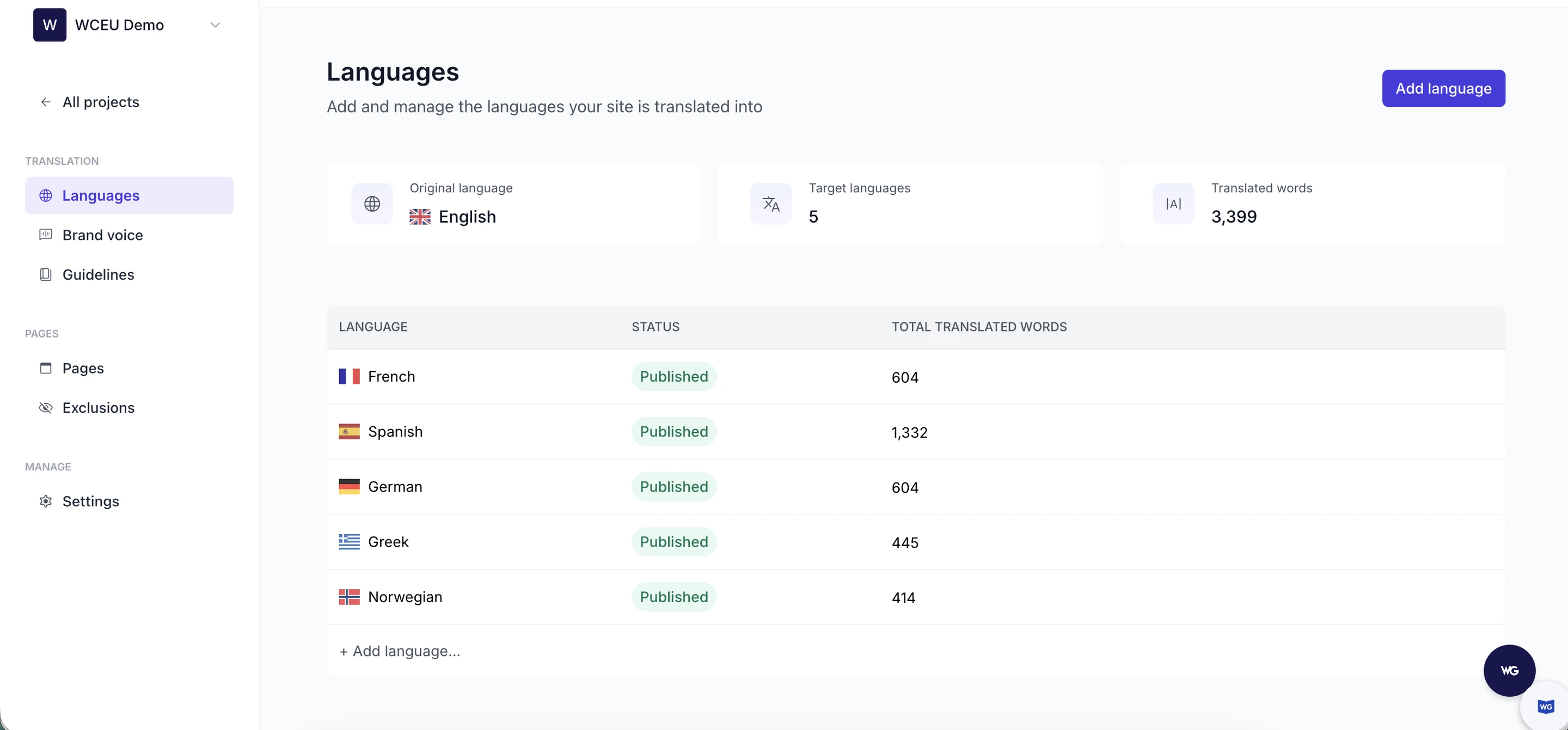
Moreover, Weglot's Translation Guidelines let users set rules for specific terms or phrases (for example, never translate the brand name, or keep acronyms in uppercase), ensuring uniformity in translations and saving time on repetitive edits.
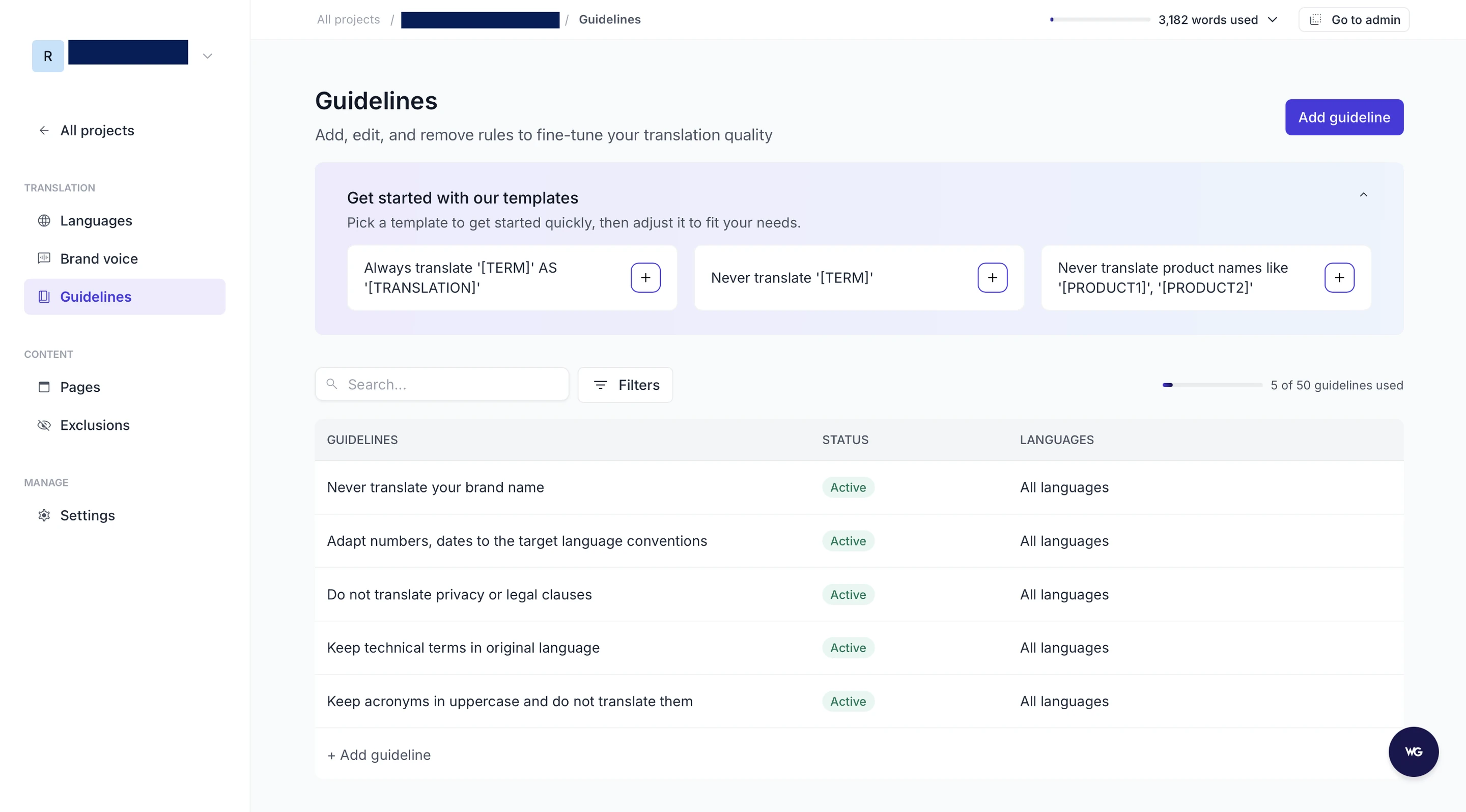
The straightforward setup, management, and overall operation mean that even those without any technical knowledge can effectively navigate the plugin and its dashboard.
And if you have any questions about the plugin, the friendly and knowledgeable support team is always there to help, as has been noted by the many positive reviews on the WordPress directory and Trustpilot.

If you want to get the best out of WPML, you’ll need three separate plugins:
The plugins are not available in the WordPress plugin search, so in order to complete the installation, you need to purchase them from the WPML website and then upload the .zip files to WordPress.

One important detail to remember is that for effective operation, WPML requires your theme and plugins to be compatible with it. Incompatibility might lead to scenarios where a percentage of your content remains untranslated. For example, texts generated by a non-compatible theme or plugin might be left untranslated or be challenging to locate and translate.
When you get started with WPML, you have two main choices for translation – “Translate Everything Automatically” or “Translate What You Choose”.

Keep in mind that the automatic translation feature only works for posts, pages, and custom post types – you can’t use it for content from the WPML string translation feature. Other than that, depending on your plan, you get a certain quota for automatic translation, and once you go over it, you have to pay extra for the words you need to translate.
The manual translation mode includes selecting all the items, such as posts, pages, and custom post types, on your site that you need to be translated. Then, the selected content is transferred to a dashboard where you can manage each translation, either manually or using WPML's automatic translation function. Translations can be batch-processed or delegated to a translation service, in-house teams, or freelance translators.
Another aspect to bear in mind is WPML's task-specific interface organization. For instance, page/post translations and string translations have their unique interfaces, requiring users to switch between different UIs based on their tasks.
Understanding the translation capabilities of a plugin is essential in making an informed decision. Let's look at the operations of both Weglot and WPML in terms of their translation process.
Weglot takes a comprehensive approach to translation, from detecting your content to translating it with its AI Translation Model.
Starting with content detection, Weglot thoroughly scans your website to pinpoint all the content to translate, such as posts, pages, menus, ecommerce products, media, widgets, headers, sidebars, popups, and more. This is not a one-off process: every time you add new content, no matter what it is, Weglot picks it up and translates it, ready for review.
Additionally, since Weglot is compatible with almost every Content Management System (CMS), including Webflow, Shopify, Squarespace, and Wix, the translated text isn’t restricted to content directly hosted on WordPress. Any content added to your website via external sources, such as lead generation forms, pop-ups, and automated email responses, is translated too.
Once the content is singled out for translation, Weglot’s AI Translation Model takes over. It combines leading AI models with your Brand Voice, Translation Guidelines, and page context to deliver accurate, consistent translations you can trust from the very start, whatever your language pair.
Weglot stores all the translations in a redesigned central dashboard. This is where you can make human edits, either in context with the Visual Editor or in bulk in the Translation List, and add collaborators to your project. The Visual Editor also covers Image Translation: the text inside your images is translated there, with the design preserved.
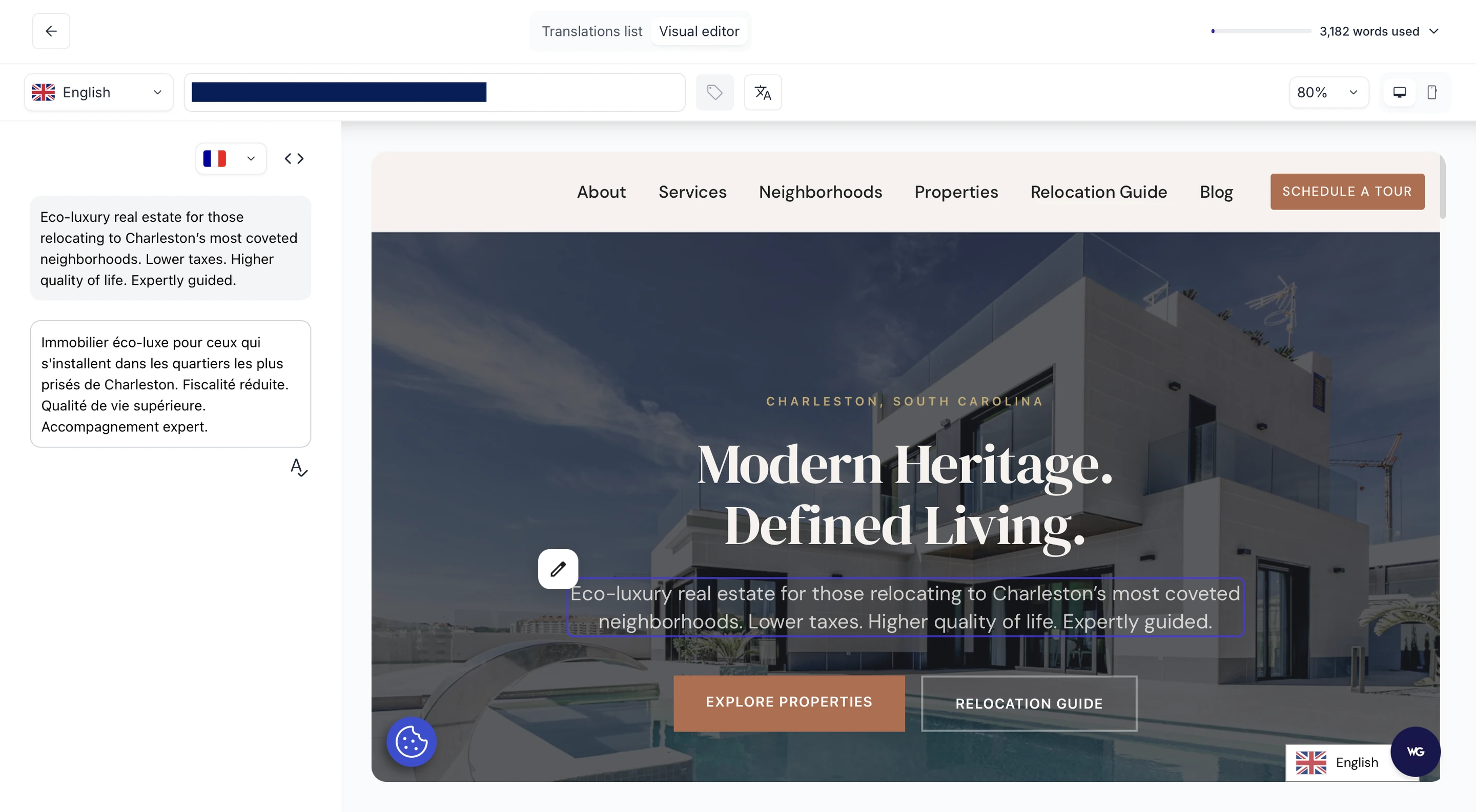
Maintaining consistency across your translated text is vital to ensure better localization and maintain brand continuity. Recognizing this, Weglot offers Translation Guidelines: plain-language rules for the terms, phrases, brand names, and product names that need to stay consistent, which you can apply to one language or to all of them.
In the content translation process, WPML users can choose their desired items and languages from the WPML translation dashboard within WordPress.

Once selected, these items are added to a “Translation basket”. The Translation basket is like a decluttering tool, bundling all your intended translations together and parking them until you’re ready to start translating, either manually or automatically.
When a translator goes into a page or post for translation, there are two available paths. The first is to do it manually – a method that opens up the text for translation line by line. This method gives maximum control over the translation but takes more time and effort.
The second approach is to implement WPML’s automatic translation feature. The automatic mode is fueled by multiple engines: Google, DeepL, and Microsoft.
WPML also provides an option for auto-translating all of a site’s content. Users can flick this switch either during the WPML setup wizard or later, within the plugin's settings. During the setup wizard, users are prompted for their primary language and asked to select additional desired translation languages.
Keep in mind that you’ll need to manually activate the translation of specific components of your site, like custom post types or custom fields. These can be switched on from the WPML Settings page.
Overall, WPML and Weglot offer comparable translation functions for your website. Both can translate a full site with AI (though you’ll have to manually request this with WPML), house their translations in a central dashboard, and extend the option for manual editing of individual translations.
Both plugins offer granular control, allowing users to edit specific translations when needed. On the other hand, Weglot reduces manual intervention: content is detected on its own, and the AI translations already follow your Brand Voice and Translation Guidelines, so there is less to correct when you review. That gives you control over how your brand comes across in each language, rather than a generic rendering of it. And, as you’ll have to trigger the automatic translations yourself with WPML, you may risk leaving untranslated content on your website or translated pages that haven’t been updated with new content.
The best translation plugins don’t merely enable you to offer your content in multiple languages – they also include multilingual Search Engine Optimization (SEO) features in order to ensure global content visibility. Let’s see how Weglot and WPML handle this.
Weglot's key multilingual SEO features include:
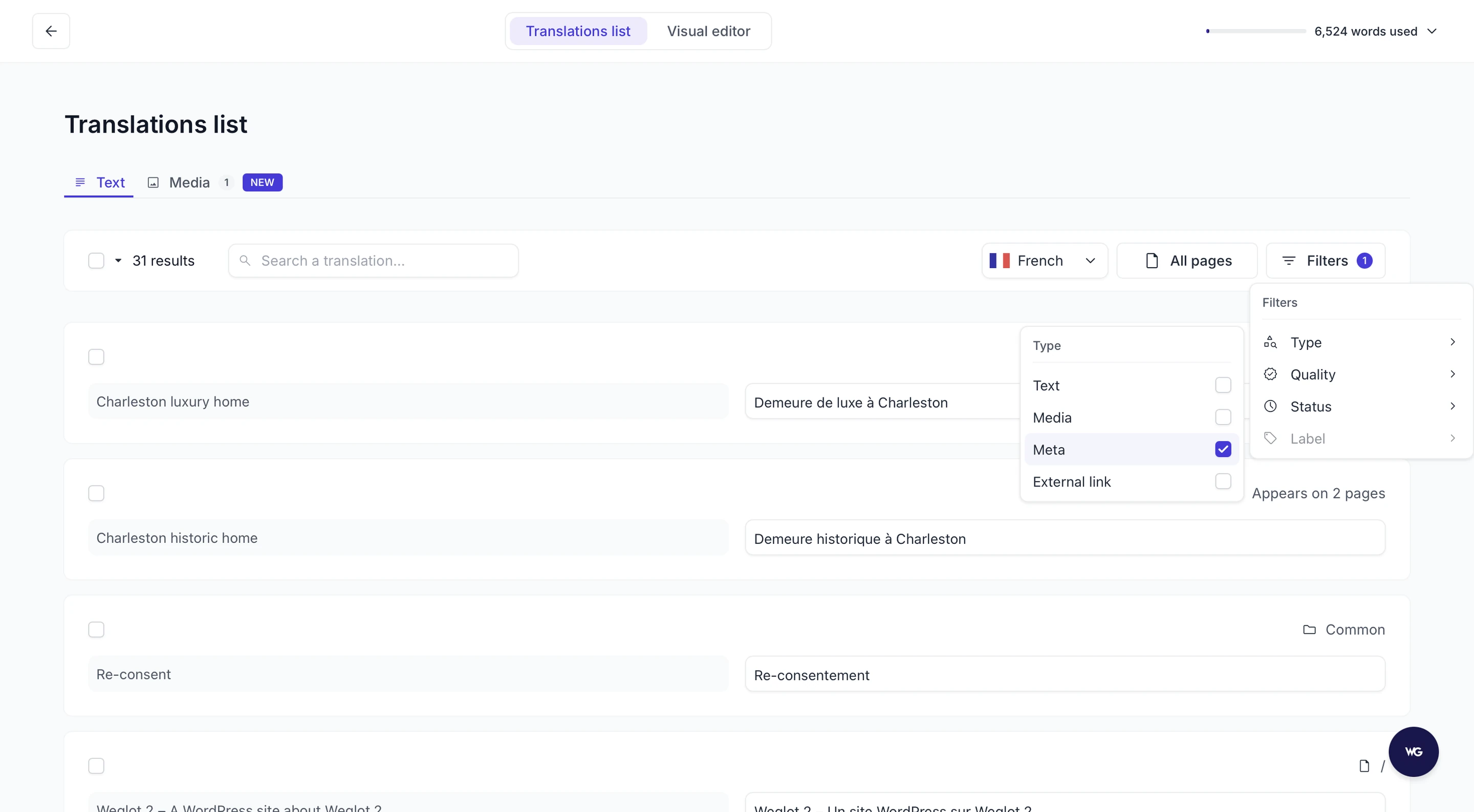
By handling these foundations for you, Weglot makes sure every published language is ready to be indexed and discovered, across search engines and AI-powered discovery experiences alike, without requiring manual SEO adjustments.
Responsive to multilingual SEO requirements, WPML offers a suite of features:
Keep in mind that to get a hold of all the WPML SEO features, you’ll need the WPML SEO add-on, as it’s not included in the base tier.
Both Weglot and WPML can be considered equal when it comes to their multilingual SEO features. Both offer essential benefits like hreflang tag implementation, metadata translation, and dedicated language URLs to help users’ multilingual content perform better in global search engine results. However, to access all of WPML’s SEO features, you need the separate WPML SEO add-on, whereas Weglot includes all multilingual SEO features in all plans.
When considering the expansion of your website's global reach through multilingual content, it's essential to compare the pricing plans of leading translation plugins like Weglot and WPML to determine which offers the best value for your specific needs.
Weglot offers a 14-day free trial, so users can check whether the plugin meets their needs. The trial includes AI translation for a single language, full editing control, access to Translation Guidelines, and Image Translation (each workspace comes with 20 image credits, one per image and language, with more available on request). Participants in the trial can also explore the multilingual SEO features and the option to redirect visitors to the right language automatically.
Following the free trial, Weglot offers a range of scalable pricing plans, and the translation quality does not change with the tier: even on the free plan, the AI translations are shaped by your brand voice.

For $17/month, for instance, Weglot users can translate up to 10,000 words in one additional language. This plan is suitable for small businesses with limited translation needs.
As users upgrade to higher-tier plans, they can gain access to enhanced customer support. Weglot's enterprise plans, offering bespoke pricing and features, provide viable solutions for businesses with atypical translation needs.

WPML, on the other hand, does not offer a free version of their software. Paid plans start at €39/year, which provides access to standard translation controls. To access the plugin’s more advanced features, including automatic translation, you’ll need the “Multilingual CMS” subscription, priced at €99/year.

It’s also worth noting that WPML's automatic translations are powered by translation credits. From a practical point of view, these credits are like tokens you exchange for translations. If Microsoft, Google, or DeepL undertakes a translation, the cost translates into these credits.
Upon subscribing to the "Multilingual CMS" plan, users receive 90,000 of these credits for free. Once these are exhausted, users can buy prepaid credits in bulk (40,000 credits for €50 + VAT; 200,000 for €180 + VAT), or adopt the pay-as-you-go pricing structure, which offers lower cost-per-word.
One benefit of WPML’s pricing to bear in mind is that account renewals are 75% of the original price, rewarding long-term adoption of the plugin for your translation needs.
When it comes to pricing, it’s important to remember that the initial purchase cost does not reflect the total potential spend. While, depending on the plan you choose, WPML's initial investment may be lower, the long-term cost can rise depending on your translation needs, subsequent credit purchases, and the number of hours it takes to set it up and maintain it, especially if you’re an agency working with multiple client sites. This means that Weglot, while typically bearing a higher initial cost, can often be a more economical choice as it’s an all-in-one plugin that is easy to set up – taking only a few minutes – and requires almost no manual work to maintain a fully translated website.
It's also essential to evaluate the overall value both plugins offer. Weglot’s higher price point comes with a broader feature range across all plans, including automatic content detection, brand-consistent AI translation, and multilingual SEO features, without the need for any other plugins. If your project calls for translating a lot of content and you value a user-friendly design, the ROI of opting for Weglot could significantly outweigh the price difference.
Different user frustrations with WPML lead to different alternatives:
Eliminating setup complexity: Agencies managing multiple client sites often find WPML's three-plugin requirement (Multilingual CMS, String Translation, Media Translation) plus compatibility checks too time-intensive. Weglot's single-plugin, universal compatibility approach reduces setup from hours to minutes.
Controlling translation costs: Sites exceeding WPML's included 90,000 credits face ongoing expenses (40,000 credits for €50 + VAT). Weglot's fixed monthly pricing eliminates unpredictable translation costs, particularly valuable for content-heavy sites.
Achieving full automation: WPML's requirement to manually trigger translation for each page/post creates bottlenecks for frequently updated sites. Weglot's automatic content detection translates new pages immediately without manual intervention.
Getting translations that sound like you: WPML's automatic translation runs on general-purpose engines with no input on how your brand writes, so the output often needs a second pass for tone. Weglot's AI Translation Model applies your Brand Voice and Translation Guidelines up front, giving you quality you can publish without a rewrite and a brand that stays recognisably yours in every market.
Ensuring theme/plugin flexibility: WordPress users frustrated by WPML's compatibility restrictions (requiring "WPML-ready" themes and plugins) find Weglot works universally with any WordPress theme or plugin combination.
Check out our quick guide to migrating from WPML to Weglot:
In this article, we've gone through the capabilities of two highly competent translation plugins: Weglot and WPML. Both offer a remarkable suite of features for anyone aiming to create a multilingual website.
Weglot is known for its intuitive interface, streamlined setup, and a workflow that keeps translation, review, publishing, and multilingual SEO in one place. With Weglot 2.0, the AI Translation Model carries your brand's way of speaking into every language from the very start, so your brand stays consistent across markets and each language is set up to be found, in search engines and AI search alike. This could be particularly beneficial if you're after a straightforward path to a multilingual website, even with little to no technical expertise.
WPML is also a solid choice, but it requires a lot more manual work to set up and, most importantly, maintain a translated website. This could be very costly in the future, especially if you manage ecommerce stores with a lot of data and other complex site structures.
Remember, the choice between Weglot and WPML should correspond to your individual needs and the specific requirements of your website. Consider your unique multilingual needs as well as the complexities your website entails when making your choice.
If you’re still not ready to make a decision, why not explore Weglot's full capabilities for yourself? Sign up for the 14-day free trial, read your site in a new language that still sounds like you, and make an informed choice for your multilingual website.

We’ll get your first languages live. You decide how far you want to go. Try Weglot for free today.
Trusted by 110,000+ global brands





Weglot is tested and trusted by brands worldwide since 2016. Join them today.


The best way to understand the power of Weglot is to see it for yourself. Test it for free and without any engagement.
A demo website is available in your dashboard if you’re not ready to connect your website yet.

.avif)


