Lokalise vs. Smartling (+ Weglot: An Effortless Translation Tool for Websites)
On this page
Written by
Reviewed by
Updated on
August 18, 2026
In this post, we look at two popular translation software platforms: Lokalise and Smartling.
Lokalise is a good translation tool for designers and developers working on large-scale translation projects for apps and digital products because you can manage translations as you develop new mobile and web app layouts.
Smartling is a translation management platform that makes it easy for a team of translators to work together and complete translation projects.
But before we dive into those tools, we want to introduce you to Weglot, a translation tool for websites. Weglot is our translation software, and an alternative to both Lokalise and Smartling. It’s perfect for enterprise companies, small businesses, and everyone in between.
Weglot is the website translation tool that translates your entire site with AI and takes it live in minutes. Weglot works for enterprise companies, small businesses, and everyone in between.
Weglot uses AI to translate your site in one click, delivering a multilingual website within minutes, while also giving you complete control over your translations.
First, you can translate your entire website with Weglot which uses leading AI translation. To customize each translation project, you can pick any URLs you don’t need translated and add a list of words you want to avoid translating (like brand names) to your own glossary.
Weglot can translate any site in minutes, no matter how big it is or where it’s hosted. Weglot doesn’t require a team of developers or designers.
Then, if you want to, your team can edit your site’s translations. With Weglot, you’re in complete control of your company’s translations.All translations can be accessed through our handy dashboard. Your team can collaborate within Weglot and make edits to your translations, and you can also order professional translation services through Weglot.
(Weglot gives you plenty of tools for managing these types of manual translation projects, too. For example, you can assign translation tasks to different people, and create specific rules for translations. It all happens in one online space, cutting back on emailing back-and-forth and painful project management.)
Plus, when you use Weglot, your translated websites are automatically displayed under language subdomains/subdirectories, which makes your life easier and helps significantly with SEO performance.
Note: We explain how Weglot works below, but you can also start your free 14-day trial and get your site translated by the end of the day.
Lokalise vs Smartling vs Weglot at a Glance
Here's how the three tools compare before we get into the detail.
Weglot
Lokalise
Smartling
Built for
Translating and running a multilingual website, on any CMS
Apps, digital products, and design-led localization workflows
Enterprise localization teams and translation agencies
How translation works
AI translates the whole site in one click, then you edit anything you want to change
AI and professional human translation, managed as projects and workflows
Machine and human translation, with translators post-editing in a CAT tool
Editing AI output
Edit any translation yourself in the Visual Editor
Editable in-platform; Lokalise's ordered proofreading and bilingual editing services don't cover AI or machine output
From $144/month (Explorer) with annual billing, up to custom Enterprise pricing
Custom quote only – no public pricing
Weglot is the website translation tool for teams who want a whole site live in minutes, with multilingual SEO handled automatically.
Ready to see your site in another language? Start with Weglot’s free tier, or take the 14-day free trial to unlock everything.
Brand-Aligned AI Translation With Complete Control
Weglot is a translation tool that works on any website – Weglot can translate an entire website (including ecommerce stores with hundreds of pages of products or listings) within minutes. You can translate your content quickly (and accurately) because Weglot uses advanced AI translation, and then gives you complete control over your translations.
Why AI Translation Speeds Up Your Website Translation Project
Letting Weglot translate your site with AI translation comes with several benefits, including:
Your site will be translated quickly. You can have a translated website up and running in minutes.
Your site will be translated with a high degree of accuracy. Weglot uses leading AI translation providers (including DeepL, Yandex, Google Translate, OpenAI, and more). And these tools are constantly translating new content – as they translate new content, their translations become more and more accurate.
Your translations sound like your brand. Our AI Translation Model learns from your brand guidelines, tone of voice, glossary, and past edits, so translations arrive already sounding like you—not like a generic machine.
You can translate your site into over 110+ different languages. With our large list of providers, you can translate your content into 110+ languages, including more difficult right-to-left languages like Arabic and Hebrew. Weglot chooses the most accurate AI translation provider based on the language pair, to give you the highest accuracy to begin with.
Your site is automatically updated. Once your translation is ready, you automatically get a unique subdomain/subdirectory for that translated site. For example, weglot.com is our English site, and weglot.com/de/ is our German site. We didn’t need to set anything complex up for that to happen – Weglot did it automatically.
You can customize how your site is translated. For example, you can create specific translation rules (such as “Apple” if you’re talking about Apple computers). You can also exclude parts of your site from translation and much more.
With these features above, most of our customers only need to use Weglot’s AI translation to create their multilingual website.
But while AI translation continues to prove its accuracy, particularly when it comes to marketing content (watch our joint webinar with DeepL for more on that), you might still want to review certain pages yourself – branded terms, legal copy, or a key landing page.
This is easy with Weglot because you retain full control of your translations.
You can simply add your translation team to your Weglot project and centralize your translation management, or equally add bilingual teammates to proofread your translations. You can also order professional translation services directly through Weglot. This keeps all of your translation-related work within one collaborative platform and outside of your CMS, ensuring security and a lightweight translated website.
How to Make Edits to Your Translated Content (If Necessary)
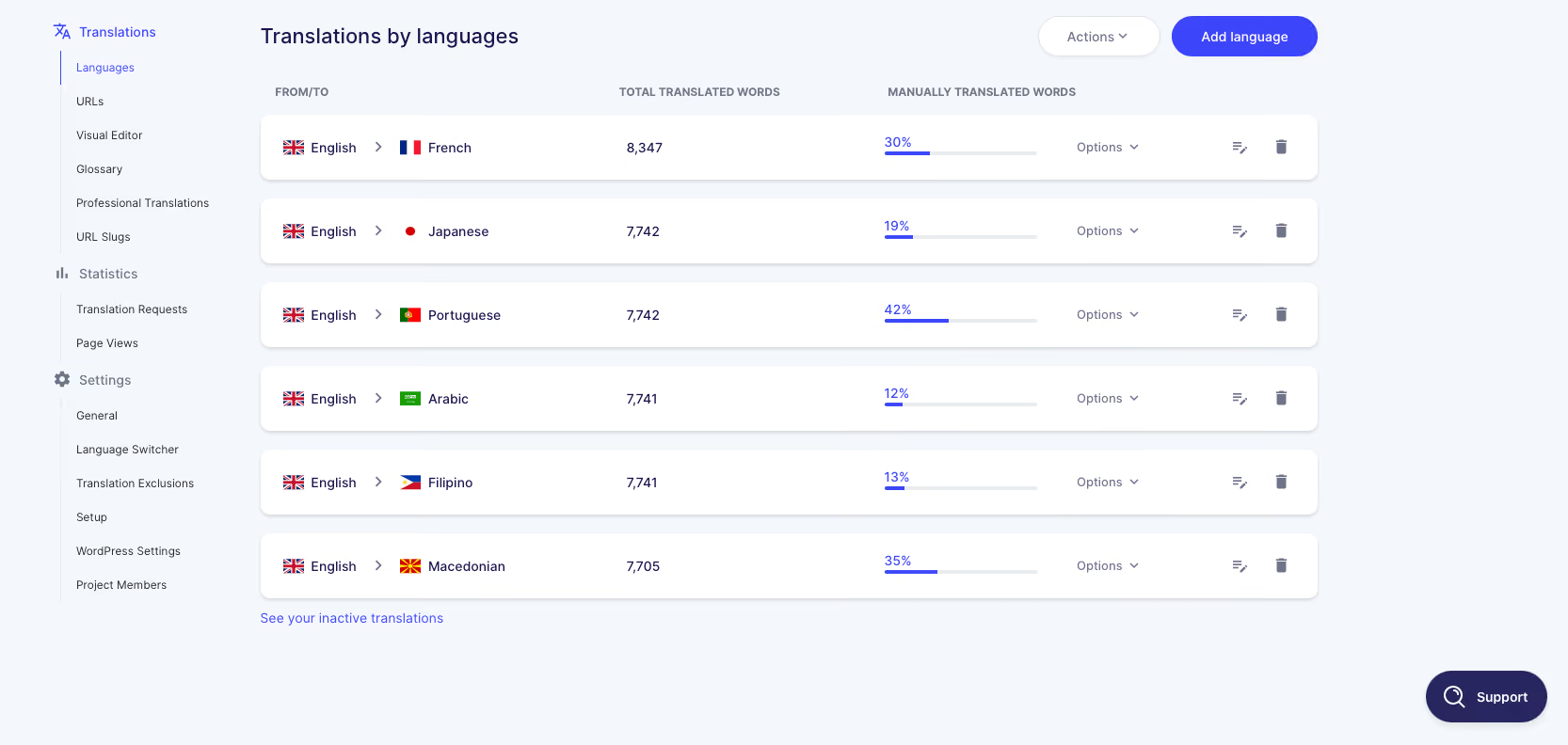
All of your translations can be accessed through your Weglot Dashboard.
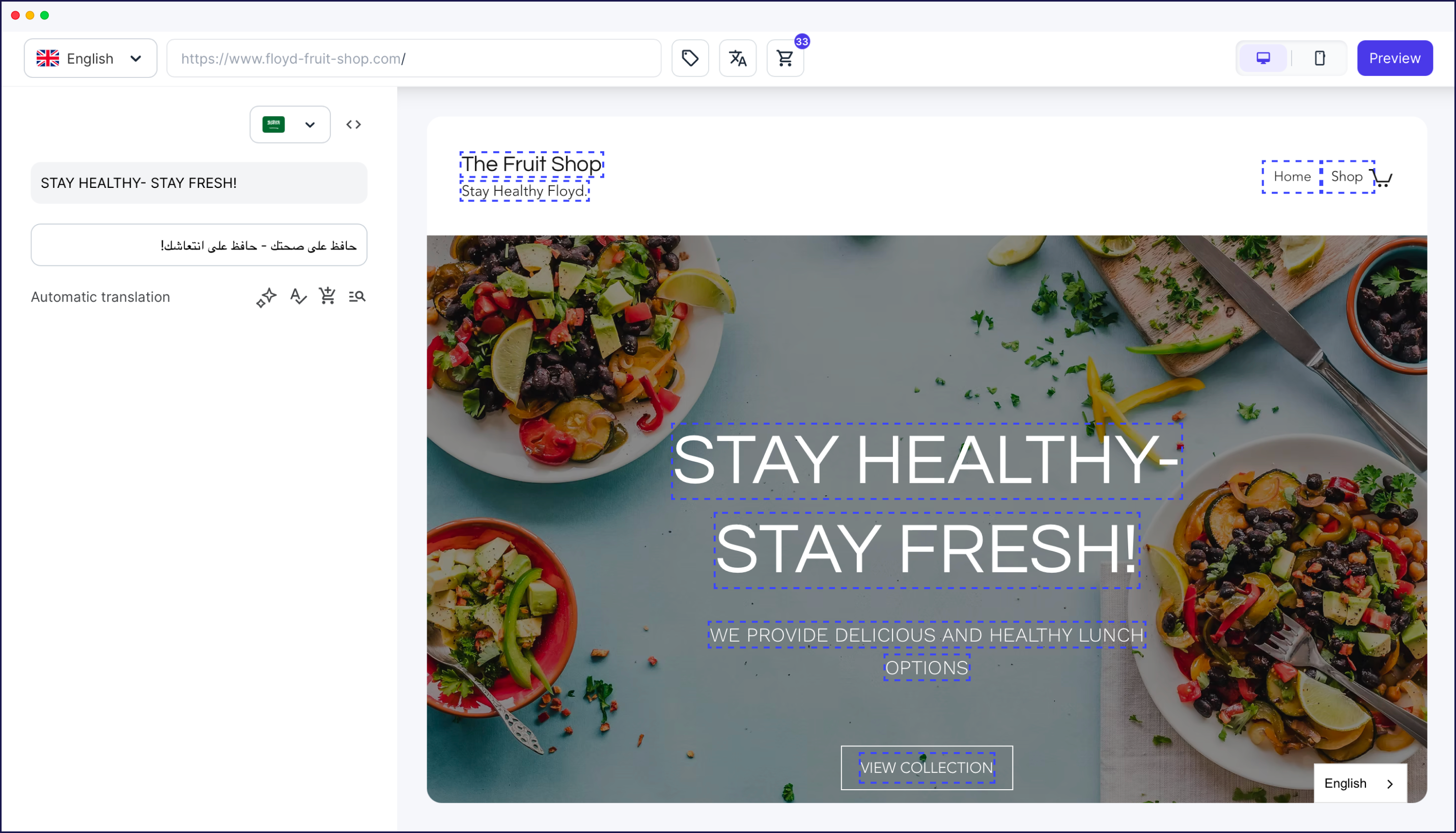
You can find the specific content you’re looking for by searching an exact URL, phrase, or using our visual editor to navigate over your site.
Edits are easy to make – you just type the changes in and save your edit. Your site gets automatically updated.
If you need help from a real-life translator, you can order a professional translator through Weglot. Once the translator has finished translating your content, it’s automatically updated on your site (after you review it).
Plus, Weglot Helps Your Translated Sites with Search Engine Optimization (SEO)
Because Weglot is used for websites that are trying to increase their audience by adding another language to their site, we also give you SEO features to help your new site rank in Google.
As we covered above, your site is translated and displayed under language subdomains/subdirectories, but we also:
Add tags to your site’s source code that tells Google you have translated sites available. This helps Google recommend your translated site to the right audience. (These are called hreflang tags. They simply tell search engines which language each version of a page is written for.)
Automatically translate alt tags and metadata. When Weglot translates your website, these on-page SEO elements get translated as well. Just like the rest of your content, you can easily edit these translations.
All of this is built into Weglot's website translation, switched on by default – there's no separate SEO setup to do.
Lokalise vs Smartling: 2 Different Translation Tools for Different Use Cases
Smartling: A Translation Management Platform for Translators, Translation Teams, and Enterprise-Level Companies
Smartling is a cloud-based translation management system, but it’s actually easier to think of it as a hybrid translation agency.
With Smartling, you can:
Order translation services. The price varies greatly on the quality you need, along with the language you’re translating into.
Rate specific translators. You can see which translators take the most time and thus cost the most per word. And you can add project managers to your workflow who can help coordinate between your design and creative departments and your translation team.
Create workflow processes. For example, once a translation is ready for review, it can get sent to your localization manager/team. Once they’ve signed off on the translation, it can get automatically sent to your design team.
Use a mix of machine translation and manual translation (though Smartling’s emphasis seems to be much more on manual translation).
Smartling is a good option for:
Localization teams that manage several localization projects involving various different file formats and websites. This makes it a good tool for translators and translation teams, but it’s not the best option if you’re not a professional translator and just want to translate your website content.
Translation teams and agencies. You can also use Smartling if you’re a translation team. Smartling gives you the tools you need to manage your projects and gives your translators the tools they need to submit translations for your clients.
How You Can Translate Content with Smartling
Smartling uses a mix of machine translation and manual, human translation. When translators use Smartling, they’re doing their work with a CAT (computer-assisted translation tool). This means your translators are using a tool to help them translate content and then making edits to that translated content as they go. An easy way to think of it is imagining a human translator with a screen open, doing machine translation, and then making edits to the translated content.
One nice benefit for teams using Smartling is you can create different jobs within a project.
For example, let’s say you’re translating a legal firm’s entire website. There will be pages on the site that are legal and technical-focused, and pages that are marketing-focused. In this case, you can create two jobs:
One for technical/legal translation
One for marketing translation
Within each job, you can then customize how much machine translation you use and specify notes/guidance for your translators. You can also create custom workflows for each job – for example, you may want the legal copy to go through a more rigorous editorial process.
When you use Smartling, you don’t need to let anyone outside your company log into your CMS or give translators access to your CMS. Instead, Smartling’s translators will make changes directly on Smartling. This is possible due to a developer API integration between Smartling and your site. When the project is finished, it can be sent to your client for review. Once it’s approved, you can push the translated content live on their site.
What Customers Are Saying About Smartling
Smartling has 3.4 stars (out of 5) based on 18 reviews on Capterra. The positive reviews tend to focus on its ability to let you manage multiple projects. However, some critical reviews highlight inaccurate translation and a difficult user interface, which slows down translations.
Smartling has 4.4 stars (out of 5) based on over 700 reviews on G2. The positive reviews focus on Smartling’s translation management features (such as its glossary for translators). The critical reviews highlighted Smartling’s billing/invoicing feature and its overall client portal (which you use to manage your clients).
Smartling’s Pricing Details
Smartling doesn’t have its pricing listed on its website but you can reach out directly for a custom quote.
Lokalise: A Translation Tool for Designers and Developers
Lokalise is a translation tool for helping developers, project localization managers, translators, and product designers who are working on projects like mobile apps and web apps. For example, if you’re translating your site but need to pay close attention to how your translated content looks on both desktop and mobile applications.
One of the key benefits of Lokalise is that you can set up integrations between Lokalise and design tools like Figma and Adobe Illustrator.
This lets your designers create mobile app and web app layouts for all languages you need hosted on your site. For example, if you’re translating your mobile app from English to German, then the spacing is likely going to be different.
How You Can Translate Your Site with Lokalise
First, you can invite translators to your project. You can put out work orders, picking which languages you want translated and the quality you want. You can also pick which parts of your site you want to be machine-translated.
You can create a workflow for your translation projects. For example, once a professional translator marks a project as translated, it will get sent to your designers who then need to design your new site’s layout around the translation.
Overall, Lokalise is a localization and translation software that’s good if you’re developing and designing a brand new site (or mobile or web app) specifically for your translated content.
And while you can use AI and machine translation with Lokalise, the setup works differently to Weglot:
Lokalise's ordered proofreading and bilingual editing services don't cover AI or machine-translated content. Lokalise classes that as post-editing, which isn't available through its Orders menu.
Lokalise's lifetime translation guarantee applies only to certain professional translation options, not to AI or machine output.
Language allowances depend on your plan. The entry-level Explorer plan covers 10 languages, with unlimited languages from the Growth plan upwards.
Overall, Lokalise is really made for a large enterprise-level endeavor where you’re dealing with localization and translation teams. Therefore, it isn’t always ideal if you simply want to translate a corporate website, ecommerce site, blog – or something that doesn’t require back-and-forth between developers, designers, and translators.
Lokalise has 4 pricing plans. The prices below are per month, billed annually.
Explorer plan: $144 per month. You get unlimited hosted words and unlimited standard seats, 5 projects, 10 languages, 240,000 AI/machine-translated words a year, 2 integrations, and 24/7 support.
Growth plan: $375 per month. Everything in Explorer, plus unlimited projects, unlimited languages, unlimited standard AI/machine translation, a glossary and translation memory, and 40,000 higher-tier "Pro AI" words a year.
Advanced plan: from $999 per month. Everything in Growth, plus 150,000 Pro AI words a year, custom AI profiles, a style guide, user groups, branching and versioning, and flexible workflow automations.
Enterprise plan: If you’re a very large enterprise, or in a highly regulated industry, you need to reach out to Lokalise for a custom enterprise quote.
One thing to keep in mind: Lokalise bills on two usage dimensions: processed words (the source words actually run through the platform) and "advanced" seats for managers, developers, and content creators. Translator and reviewer seats are unlimited on every paid plan, and so is content storage. Pro AI words are capped per plan and sold as add-on bundles beyond that, so a content-heavy site can pay more than the headline price. As with Smartling, professional human translation is charged separately at a per-word rate.
Lokalise vs Smartling vs Weglot: A Quick Recap
Above, we covered two different translation platforms.
Smartling: A translation management platform that makes it easy to work with your translation team. You can order manual translations or machine translations, though most of Smartling’s features are aimed toward managing actual translators. You can also create unique projects with specific glossaries and automation within each project. Smartling helps a large team of translators work together to complete the same project.
Lokalise: A translation tool that lets you manage your entire localization workflow. This means helping your designers and developers and translators work together across websites, web apps, and mobile apps – all while communicating exclusively in Lokalise.
We also covered Weglot, the tool built for translating websites specifically.
Weglot will translate your entire site, ecommerce store, or private app with advanced AI translation. This process takes minutes, not hours or days. And once it’s done, you have a live, multilingual website.
You have control over your translations. You can either leave the translations as they are (which about ⅔ of our customers do, as the translations are that accurate). Or you can make edits to your translations. You can have someone on your team make edits or you can order professional translation services through Weglot.
Weglot is the translation tool built for websites: AI translates every page in one click, multilingual SEO is handled automatically, and every translation stays editable.
The integration was easy and the support is incredibly helpful. I highly recommend Weglot to anyone looking for a simple and cost effective solution to translate their site!