Try Weglot for free


Multilingual websites allow you to reach a larger market and sell to individuals and businesses internationally. Adding another language to your site means you can potentially double your reach and get more business domestically and abroad.
Platforms like WordPress, Shopify, Wix, and Squarespace all support multilingual functionality through translation plugins or built-in features.
This guide covers creating websites in two or more languages, from multilingual to massively multilingual. We’ll also show you how easy it is to use Weglot to create a multilingual website for your company – in minutes!
There are two key benefits to a multilingual website:
A multilingual website is essential for large and small businesses operating internationally. Let’s look at the figures:
Put all these stats together, and there’s a huge chunk of potential customers you could be missing out on.
Translating your site into another language says something about your brand – you’re modern, outward-looking, and flexible.
Even if your website visitors have English as a second language, creating a multilingual website in their language will make it easier for them and demonstrate that you’re serious about engaging with them. That can send a very powerful message, and even mark you out from your competitors.
Finding a multilingual website solution for your existing or brand-new site isn’t always easy. Some of the features you need include:
Let’s take a look at each of these in detail:
High-quality translation conveys meaning naturally and accurately, preserving your brand’s tone and intent. The best tools ensure your translations are reliable from the start, using advanced machine translation that you can easily review and manually edit at any time for the highest level of precision. These offer quality that’s far beyond what visitors get from free browser like Google Translate.
It will save you time and money if your translation solution is easy to set up and can be automated.You’ll also need a tool that automates technical SEO for both languages – multilingual SEO tips include having hreflang tags and language-specific URLs so search engines know which version to show each visitor.
A good solution should translate your website, whatever platform you’re using, and whatever browser your visitors are using. Whether you’re using WordPress, Shopify, Wix, or another platform, you need to know it works.
Your first thought might be to set up a separate website for the foreign language and use it for content aimed at the second market in the second language. Or you might decide to use a WordPress multisite network and host the two sites on that, with a different domain name or subdomain for each.
Creating multiple sites will give you more work and could be very expensive. It will double the website management, web design, and content creation workload, and it will double your hosting costs. It could impact your SEO and might confuse users. It also doesn’t actually solve the problem of how you’ll translate your site.
It’s far simpler to use a multilingual solution to translate your site into whichever language your current visitor prefers. That way, you only have one site to manage, one set of content, and one domain name.
So how can you build a multilingual website without all that extra effort but make sure it’s high quality, SEO optimized, and flexible? Simple – you need a premium quality translation tool.
Several tools take different approaches to website translation, from multilingual website platforms to specialist tools and page builders. The right one depends on your platform, setup complexity, and budget.
Comparison of popular translation tools for multilingual websites
AI-Powered Translation Tools (like Weglot): These are best for speed, multiple languages, and limited technical resources. Choose an AI translation tool when you need your site translated in days not months, support 3+ languages, have limited dev resources, or want automatic updates when content changes.
Database Translation Plugins (like WPML, Polylang, and TranslatePress): These are best for WordPress-only sites where owning your translation data on your own server matters more than setup speed. Choose a database plugin when you want full control over translation storage, and have the time for a longer configuration process.
Weglot is an all-in-one translation tool designed to make creating and maintaining multilingual websites straightforward. It lets you add new languages to your site and gives visitors the option of choosing their preferred language. You can also set it to detect users’ location and display the right language automatically.
Weglot starts with a first layer of AI translation from DeepL, Google Translate, and Microsoft Translator. That gives you a fully translated site within minutes as your foundation.
AI translation delivers an approximate 85% human-level accuracy, which works well for blog posts, help documentation, and informational pages. For legal pages, product descriptions, and marketing headlines, you can refine translations in the Visual Editor or order professional translator review directly from your Weglot dashboard.
Weglot’s AI Language Model, powered by OpenAI and Gemini, learns from your brand guidelines, glossary terms, and past edits. It generates translations that already sound like your brand – putting translation quality on autopilot. The more you use it, the better it gets, so your translations improve as your content scales.
💡 Weglot Tip: AI translation + selective human editing = the fastest path to quality translations at scale.
The Weglot translation tool is also optimized for search engines in both languages of your multilingual website
Team collaboration is also made easy with Weglot. So if you have one person uploading English content (or whatever the primary language is) another team member managing translations (either automated or human), and yet another managing content optimization and SEO, Weglot will give them all the access they need to make your multilingual website really shine.
{{demo-banner}}
As we’ve seen, Weglot is designed to work with all the major Content Management Systems (CMS) and software platforms, including WordPress, WooCommerce, Shopify, SquareSpace, Wix, and Weebly.
.avif)
Integrating translated content into your multilingual website with Weglot is designed to be simple. It detects all of your website content (including homepage, blog, drop-down menus, headers, sidebar widgets, etc.) and translates it automatically. If you need to, you can review and edit the translated content, or you can just leave the software to do all the work.
Weglot also includes a customizable language switcher. When users change languages through the switcher, all content on the page translates instantly. We’ll detail this more below.

A multilingual website needs proper technical SEO so search engines can find and serve each language version correctly. Weglot automates the heavy lifting – URL structure, hreflang tags, and metadata translation.
Weglot creates subdirectory URLs automatically – e.g. example.com/en/ for English and example.com/fr/ for French. This structure keeps all your authority consolidated on one domain, which is better for SEO than splitting across subdomains or separate country-code domains. No configuration is needed.
If your setup requires it, subdomains and ccTLDs (country-code top-level domains) are also supported.
💡 Weglot Tip: Subdirectories (/en/, /fr/) are recommended for SEO authority consolidation.
Hreflang tags tell search engines which language version of a page to serve to which audience. Without them, a French-speaking user might land on your English page – or search engines might treat your translated pages as duplicate content.
Weglot generates hreflang tags automatically for every page. Each page references all its language versions plus itself, and the tags update whenever your content changes. No manual coding is involved and no technical expertise is required.
Without this automation, hreflang errors are common and can hurt your visibility in international search results.
💡 Weglot Tip: Weglot automates hreflang tags – tech free.
Weglot translates the metadata that search engines rely on – meta titles, meta descriptions, URL slugs (example.com/en/about-us/ vs example.com/fr/a-propos/), heading structures (H1-H6), and image alt text.
Metadata translation is particularly important for earning click-throughs on international Search Engine Results Pages (SERPS). Local users are far more likely to click on listings that appear in their own language.
A multilingual structure personalizes your content for different users. Each language version can target its own keyword set, and the queries different nationalities are searching for.
You can also build a specific link profile for your foreign language pages to your native language pages. This builds parallel authority without diluting your English rankings. And visitors reading in their preferred language are more inclined to bounce less and engage more, which sends positive signals to search engines.
Translation affects more than words. Your layout, typography, and visual elements all need to adapt. Weglot addresses the most common design challenges automatically.
Translated text varies in length. German expands to an approximate 30-35% compared to English, with Finnish around 20%. French, Spanish, and Italian may expand text by 15-20%.
Weglot preserves responsive layouts when text length changes, with flexible CSS that prevents layout breaks.
💡 Weglot Tip: Design with 30-35% text expansion tolerance for German translations.
RTL languages like Arabic, Hebrew, and Farsi require full layout mirroring – navigation, forms, and UI elements all flip. Weglot handles RTL text direction automatically, and navigation and forms adjust without coding. Some design elements may still need a separate review, but the bulk of the work is done for you.
Beyond translation, consider visual and formatting differences. Images should reflect target demographics, colour meanings vary across cultures (red signals luck in China but danger in the West), and date formats differ (MM/DD/YYYY vs DD/MM/YYYY). Currency displays, decimal separators, and measurement units also need attention.
Weglot translates system text, form labels, and error messages automatically. Cultural adaptation of imagery and region-specific formatting is worth reviewing during setup and major content updates.
A language switcher is how visitors choose their language – if they prefer a different one to that suggested by their browser. It should be visible, clearly labelled, and consistent across your site.
Weglot places the switcher in your website header by default, so users find it without scrolling. It stays visible on every page across all devices. You can also place it in the footer, a utility bar, or a slide-out menu on mobile, and configure the switcher to your liking.
Best practice is to display language names in their native script. That means ‘Français’ (not ‘French’) and ‘Deutsch’ (not ‘German’). Weglot supports flag icons paired with text labels – though flags alone can create ambiguity (UK vs US English, for example), so text labels are the clearer option.
When visitors switch languages, Weglot takes them to the same page in the new language – not the homepage. A French product page becomes the same product in English. Remember that Weglot also remembers the user’s preference via browser storage, and manual selection always overrides automatic detection.
💡 Weglot Tip: Avoid automatic IP-based redirects – let users choose their language.
Touch targets meet the 44x44 pixel minimum accessibility standard. On smaller screens, Weglot displays abbreviated codes (EN, FR, DE) with full names on tap. There are no hover-only interactions – everything works with touch!
The most translated website in the world is JW.org, available in over 1,000 languages. Wikipedia comes in second at 300+. Most businesses don’t need quite that range – starting with 2-3 strategically chosen languages makes the biggest impact.
Ron Dorff is an ecommerce brand fusing Swedish functionality with French style.

They needed a website translation tool that was easy to use and could translate all of their French-language content quickly, without missing anything. Their entire site was translated with Weglot in a matter of days. As a result, traffic increased by 400%.
The Bradery is an ecommerce brand that runs flash daily sales from ethical fashion brands to help with overstock.

They needed a multilingual ecommerce site in two languages that would be easy to manage and could scale. They quickly discovered one of Weglot’s stand-out features – the option to blend human and AI translation which allowed them to handle the 500+ products they add to their site daily.
“The biggest win for us is the time we've saved. It takes us about ten minutes twice a week to double-check everything is running how we want it.”
– Adèle Aubry, Ecommerce Manager, The Bradery
For more inspiration across ecommerce, SaaS, tourism, and media, check out these multilingual website examples.
Setting up a multilingual website with Weglot consists of a simple step-by-step process.
Watch the full walkthrough here, or carry on reading below!
Once you’ve installed and configured the languages you want to use (e.g. from the English version to Spanish), it will automatically translate all of your content for you. To manage translated content, you use the in-context editor. This lets you translate and optimize the content on your multi-language website. You can translate and manage any new content you add in exactly the same way.
To access your translations in the Weglot Dashboard, select the Visual Editor, then the start editing button. Your site will open up in a new browser tab with the translatable content highlighted.
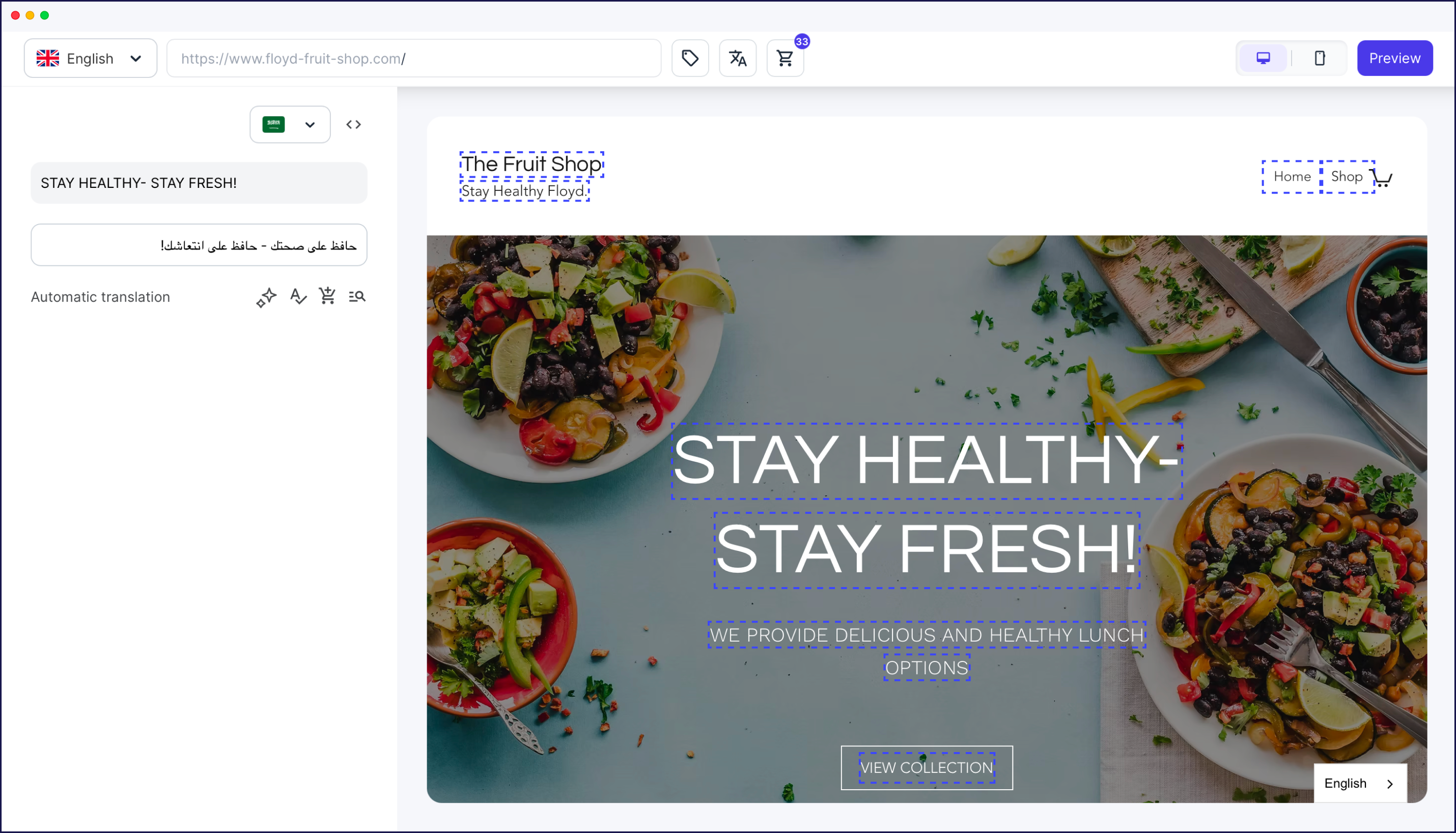
If you’re planning on using human translation, you can access translation services from the dashboard. Go to Translations, then click on the language you need. You can then select a piece of content (e.g. a page or post) that’s been translated and order a human translation right from your Weglot dashboard.
Once your content is translated, you can optimize it for SEO using the in-context editor to tweak your translated content and include keywords.
Supporting all this is the team collaboration feature. You can invite new members to the team in the Weglot dashboard by clicking on Settings and then Team. From here, you can manage team members and invite new ones.
Remember that Weglot creates subdirectory URLs automatically (example.com/fr/, example.com/es/) with proper hreflang tags included – there’s no manual configuration needed at all.
Running a multilingual website takes ongoing attention. But with the right setup, every common challenge has a clear fix.
Creating a multilingual website could open your business up to twice the market. If you can find a translation tool that’s easy to use but translates all of your content accurately and quickly, you’ll be able to reach more customers and strengthen your brand.
Before starting your multilingual website:
☐ Define target languages based on audience research.
☐ Choose your platform (WordPress, Shopify, Wix) and verify compatibility.
☐ Decide URL structure (subdirectories recommended for most sites).
☐ Assess translation needs: AI-only vs hybrid with human review.
☐ Set budget expectations (tool costs + potential translator fees).
Launch verification checklist:
☐ Language switcher visible in header/footer on all pages.
☐ Each language has dedicated URLs (/en/, /fr/, /es/).
☐ Hreflang tags implemented (verify in page source).
☐ Metadata translated (titles, descriptions) for main pages.
☐ Search Console tracking configured per language.
As we’ve seen, creating a multilingual website could open your business up to brand new markets and heaps more customers. If you can find a translation tool that’s easy to use but translates all of your content accurately and quickly, you’ll be able to reach more customers and expand your brand.
Using the Weglot translation tool to translate and manage your multilingual site makes it easy, which in turn frees up time for you to focus on your content and your core business.
Try Weglot’s 14-day free trial on any of our plans and go multilingual in a matter of minutes.


Trusted by 70,000+ global brands


Start with your highest-traffic pages: homepage, main products or services, and contact page. Expand from there based on user behaviour data. Most translation tools let you exclude certain pages, so you can focus on quality over quantity.
Not if it's set up properly. Weglot uses CDN delivery, and only the active language loads at any given time – not all languages at once. Page speed stays consistent across language versions.
AI translation provides a 70-85% human-level accuracy baseline. Use glossary rules for brand-specific terminology, review critical pages (pricing, legal, marketing) through the Visual Editor, and order professional review for regulated industries.
Yes, though complexity varies. Most tools support translation export, and content can be migrated to a new system. Consider your long-term needs upfront to minimise future migration work.
Whichever platform you prefer, Weglot makes set-up easy – all follow the same pattern: install, configure, review, publish.
WordPress + Weglot
Shopify + Weglot
Wix / Squarespace + Weglot

Reach new audiences in minutes without sacrificing your team’s time. Anyone can install it.


