Try Weglot for free


Thanks to the Internet – and the resulting globalization – everyone is connected in ways that were previously unthinkable.
For instance, the standard for many businesses – especially those in ecommerce – is to serve customers almost anywhere in the world.
But this accessibility comes with a new challenge: you’ll have to work harder to reach your intended audience and catch their attention. Especially if they speak a native language other than English.
When you’re trying to enter new geographic markets, you’ll need website internationalization to succeed. Also known as i18n, this is the process of ensuring your website is set up to handle different languages and your overall website architecture is able to accommodate these.
Here are the fundamentals of website internationalization:
Website internationalization is the process of preparing your website to support multiple languages, regions, and cultural formats – without rebuilding it from scratch each time. Developers shorten it to i18n because there are 18 letters between the ‘i’ and the ‘n’.
An international website is fully-translated into your target audience’s preferred language and adapted for cultural differences: naming conventions, date formats, numeric styles, and more.
You’ll also need to understand how to translate, store, and publish multilingual content. Your CMS sits at the center of that project, and i18n gives you the flexibility to localize your product and content for any market.
Without website internationalization, your foreign audiences won’t understand what it is you can offer them – especially if they don’t speak your website’s language.
Even if they did have some level of fluency, 40% of consumers won’t engage with a business if the website is in another language.
If you’re keen on targeting markets within the same area, speak the same native language, and have shared cultural references and nuances, there’s no reason to internationalize your website. However, if you believe your business has the potential to woo audiences across the world, website internationalization – and localization – are indispensable to your success.
Internationalization has several moving parts, each one setting the stage for the next. Key technical considerations include URL structure, character encoding, text externalization, flexible layouts, RTL language support, and locale-sensitive formatting. Let’s take a look at them in detail.
Before you write a line of code or install a plugin, there are a few planning decisions to make. First, choose which languages and regions you want to target. Then map out your URL structure (more on this below), confirm your CMS supports multiple languages, and decide whether you’ll use AI translation, human translators, or both.
Getting these decisions right upfront means your architecture will treat each language version as a distinct page – not a duplicate – which matters a lot for search engines.
Deciding on the right URL structure for your website will help you successfully target a specific country while ensuring that Google presents your website in search results.
There are a few URL structures to choose from:
For most websites, subdirectories (yourwebsite.com/fr/) are the better choice for international SEO. They sit under your main domain, so they inherit its authority and are easier to manage than separate subdomains or ccTLDs. Subdomains (fr.yourwebsite.com) can work well for larger sites that need cleaner separation between regions, but they’re treated more like independent sites by search engines – which means they start with less inherited authority.
The best practice is to keep your localized pages under language-specific subdirectories on the same domain. Search engines will recognize each version as distinct, avoiding duplicate content issues, while still benefiting from your domain’s overall strength.

Read more about the impact of URL structures with our guide to international SEO.
It’s also important to add hreflang tags to your source code. They look like this:
These are hreflang tags targeting English speakers in Australia.
Hreflang tags are HTML attributes that search engines use to detect and understand a web page’s language and what geographical area it intends to reach.

For example, if you put into Google “Apple official website” in Canada, the first result the search engine will suggest to you will be “https://www.apple.com/ca/”. This will make sure that Google won’t present your English-speaking audience in Canada with a Spanish webpage made for users in Colombia. These are all thanks to hreflang tags.
Doing this will help Google identify the page’s language and what region it’s meant for. Adding a language redirection function will also display the right language for your website visitor, ensuring they have an optimal user experience.
If you’re using a CMS for your website, you’ll need one that easily accommodates different languages. Most popular technologies, like WordPress, Squarespace, Shopify, and Webflow fit the bill. Each offers its own way of adding languages to your site.
However, this is made even simpler if you use Weglot, which works with all website technologies.. It smoothly integrates with your website builder’s theme (and other site functionalities, like ecommerce plugins) while instantly translating all your content.
That means you’ll have no problem using your current templates across the different language versions of your website, offering a more consistent user experience.

Character encoding is the system that tells your website how to store and display text. UTF-8 is the standard for internationalized websites – it supports virtually every language and character set in the world, from Latin scripts to Arabic, Chinese, and beyond.
Without UTF-8, characters in certain languages can render as garbled symbols or question marks. Setting UTF-8 at the server, database, and HTML level (via a <meta charset="UTF-8"> tag) keeps everything consistent across all your language versions.
Text externalization means separating your website’s written content from its underlying code. Instead of hard-coding text strings into your templates, you store them in resource files – typically .json, .xml, or .po format – and call them dynamically.
This approach makes translation far more manageable. Translators work with the resource files directly, without touching your codebase, and developers can swap language files without redesigning anything. It’s the foundation of a scalable multilingual setup.
Things will not retain their visual harmony across different languages unless you specifically configure them to be, making this a vital aspect of internationalization.
When translated text is visually longer or shorter than the source text, this is what’s called text expansion and contraction.
A website that isn’t optimized for this will look awkward and unwieldy across different languages, leaving strange-looking gaps between content blocks or spillovers into the background.

A multilingual website must adapt its design and layout according to whatever language it’s in.
For instance, it will increase the size of the text for languages like Japanese, Chinese, and Korean so that the characters are more visible and easier to read.
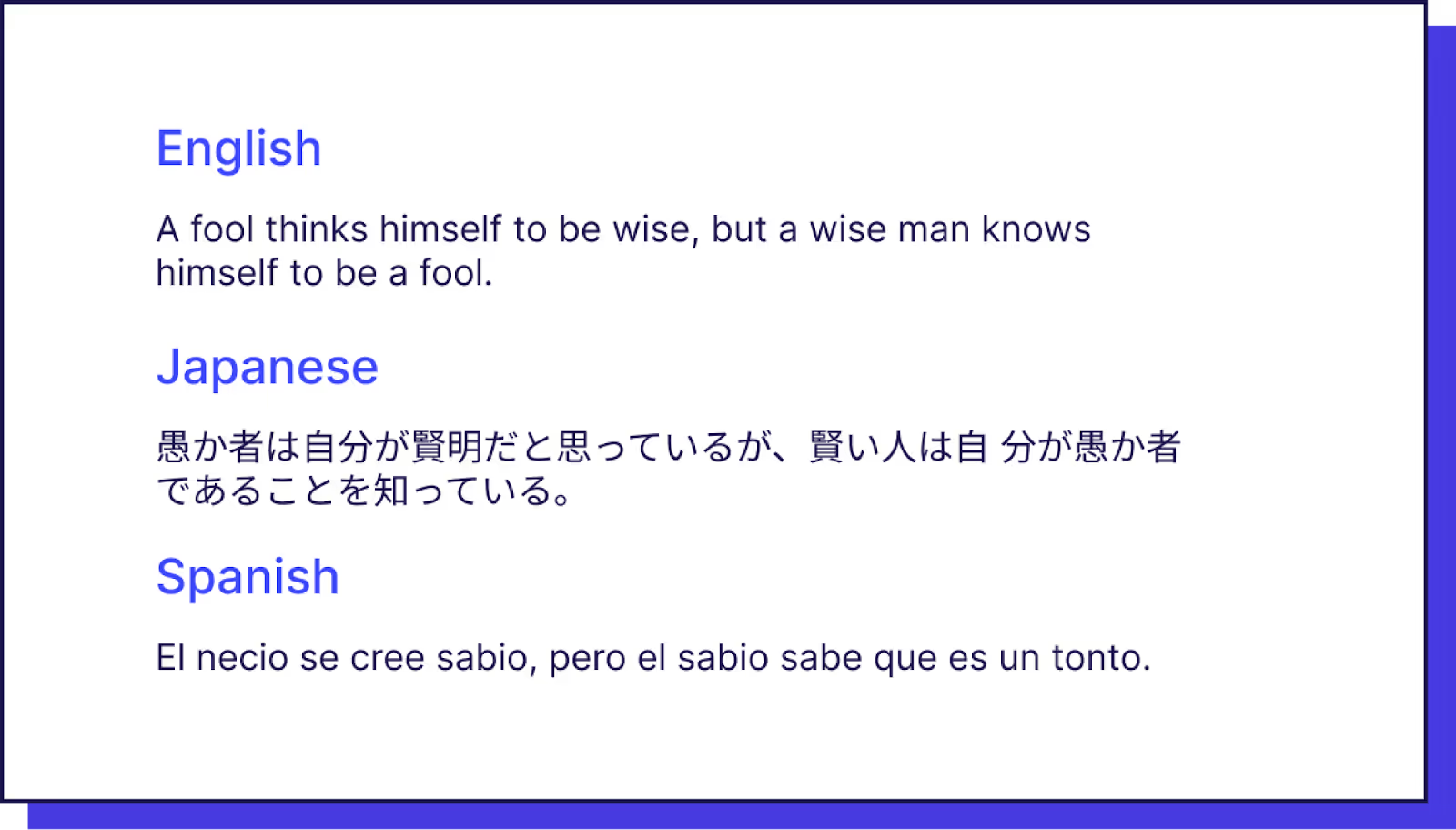
Another aspect to keep in mind is that Right-to-Left languages like Arabic and Farsi are formatted differently. Your layout and user interface will look clunky and inelegant when it isn’t optimized for languages in both directions.
In fact, some websites have completely flipped the interface to provide a better viewing experience for speakers of RTL languages. Take Facebook for example.


Mirroring your web design would be the simplest way to go about this, and it’s something Weglot can do for you once you’ve added a few CSS rules.
One of the more developer-friendly ways to handle RTL layouts is CSS Logical Properties. Instead of using directional values like margin-left or padding-right, you use properties like margin-inline-start and padding-inline-end. These automatically adapt to the document’s text direction – so the same CSS works for both Left-to-Right (LTR) and RTL languages without writing separate rules for each.
Translation handles words. Locale formatting handles everything else – and there’s more of it than you might expect.
Dates and times: The US writes dates as MM/DD/YYYY, while most of Europe uses DD/MM/YYYY and Japan uses YYYY/MM/DD. A date like 04/05/2025 means April 5th to an American and May 4th to a British reader. Time formats (12-hour vs. 24-hour) also vary by region.
Currency: It’s not just about the symbol. The euro sign (€) goes before the number in some countries and after in others. Decimal and thousands separators also flip – 1,000.50 in the US is written as 1.000,50 in Germany, whereas Japanese yen has no decimals at all.
Numbers: Alongside pricing, pay attention to statistics and measurements. The US will use ‘25.5%’ as an example stat, but you’ll likely see ‘23,5%’ in France. In cooking, English and American ‘cup’ sizes differ, so a distinction needs to be made in recipes.
Getting these right signals to your visitors that you’ve built your site for them – not just translated it.
If your website runs on JavaScript, there are two libraries that are widely used for managing internationalization in web apps.
i18next is one of the most popular i18n frameworks for JavaScript. It handles language detection, translation loading, and locale formatting, and integrates with frameworks like React, Vue, and Angular.
FormatJS (which includes the react-intl library) focuses on locale-sensitive formatting – dates, times, numbers, and currencies – using the Unicode CLDR standard. It’s the go-to for teams that need precise, spec-compliant locale handling.
Both libraries work well together: i18next for translation management and FormatJS for formatting.
There are some pages you wouldn’t want to be translated for all language versions. Some content would be applicable to a specific audience, so it wouldn’t make sense to translate that for other users.
Luckily, Weglot makes translation exclusions simple, and you’ll be able to exclude everything from URLs to pages to content blocks.
Ready to internationalize your website with Weglot? Try it for free today.
You’ve likely heard of the term website localization when researching the topic of internationalization.
Website localization is the process of adapting your multilingual site to offer a relevant user experience to your new foreign audience. This includes nuances in language and cultural references to customize it to fit your target market’s needs.
For instance, a localized website consists of content that contains specific references that your particular target audience resonates with.
It’s also adapted so that the naming conventions and numeric formats like the time, date, currency, and even units of measurement are what’s standard to them.

Internationalization (i18n), localization (l10n), and globalization (g11n) are related but distinct concepts – and they're often confused.
Globalization (g11n) is the broadest of the three. It refers to the overall strategy of designing and growing a business to operate across multiple countries and cultures.
Internationalization (i18n) is the technical groundwork: making your website architecture flexible enough to display different languages, regional formats, and scripts correctly.
Localization (l10n) is what comes next: adapting that flexible foundation to fit the specific language, culture, and expectations of each target market.
You can't have one without the other. Internationalization sets the infrastructure; localization makes it feel native.
Internationalization has a lot of moving parts. Weglot is designed to handle most of them for you.
Once installed, Weglot uses AI translation – powered by OpenAI and Gemini – to detect and translate your content automatically. Your custom AI Language Model learns from your brand guidelines, glossary, and past edits, so translations improve over time and already sound like your brand from day one.
Whether you’re starting fresh or partway through your internationalization setup, Weglot makes your site multilingual-ready in minutes.

There’s no need to create duplicate pages or websites ever again when you’ve installed Weglot. It automatically translates your pages for you, then instantly displays them under language-specific subdirectories or subdomains.
Then, you can configure your website so that it redirects visitors to the website that matches their web browser language.
To do this, simply enable user redirection. No need to mess around with your website HTML or CSS each time you make updates to your website content – Weglot takes care of all of this for you.
Yes, even if your website was built using JavaScript. If you’re in the staging process of creating a multilingual website, or simply don’t require multilingual SEO (such as a private app) then you can use Weglot’s JavaScript integration.
How does this work? When a visitor requests a page on your website, your server sends the page to the visitor’s browser in the original language. It calls the Weglot JavaScript library using a script tag.
Then, the library detects the user language (based on user settings or location). It collects the content, then sends it to Weglot’s Translation API. This API sends the translations back, and the Weglot JavaScript library swaps the original content for the translated ones.
With Weglot’s Visual Editor, you can easily preview the languages on your website before you publish them. This gives you the opportunity to modify your copy and adjust your overall website design to provide your visitors with the ultimate user experience.
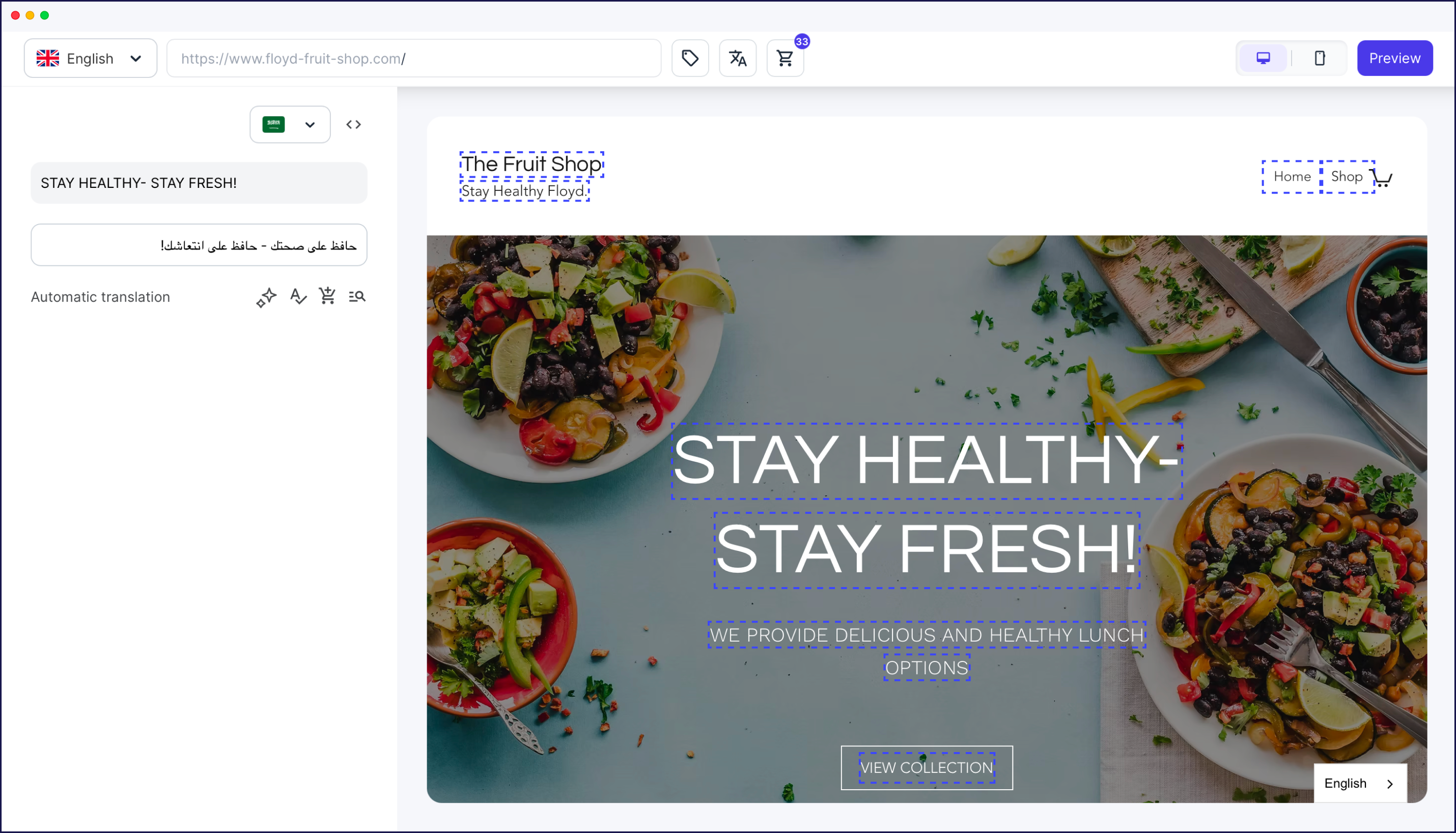
You’ll even have full design control over your language switcher with intuitive design editing options within your Weglot Dashboard or you can make CSS edits if you require something more custom.

SEO isn’t something you have to configure yourself with Weglot, as it follows Google’s best practices for multilingual SEO. It displays your translations in your source code and automatically adds hreflang tags. That way, your new markets will stumble upon your content more easily.
{{ebook-banner}}
Weglot naturally takes care of localization. We offer automatic content detection, full editing control over your translation quality, and an automated workflow that syncs with your site in real-time as you add content. Your AI Language Model handles quality on autopilot, and when you want to step in – to fine-tune a specific page or market – the Visual Editor, glossary, and translation memory are right there.
Getting internationalization right pays dividends. When visitors land on a version of your site that speaks their language – really speaks it, with the right date formats, currencies, and cultural references – they stay longer and convert at higher rates.
The good news is that it doesn’t have to be a months-long project. With Weglot’s AI translation and custom AI Language Model, you can have a multilingual-ready site up and running in minutes. Sign up for a free 14-day trial today and see for yourself.


Trusted by 70,000+ global brands


Here’s a checklist organized by phase:
If you’re not a developer, here’s a short version:
Accessibility and internationalization share a lot of the same foundations.
Using semantic HTML – proper heading hierarchies, labelled form fields, and descriptive alt text – makes content easier for screen readers and also makes it easier for translation tools to parse and handle correctly.
Designing with flexible layouts rather than fixed-width containers helps both screen magnification users and text expansion across languages.
Supporting keyboard navigation works across all languages and input methods. And providing text alternatives for images means you have content that can be translated – rather than untranslatable embedded text in graphics.
Building accessibly tends to produce cleaner, more structured code, which is also exactly what makes a site easier to internationalize.

Reach new audiences in minutes without sacrificing your team’s time. Anyone can install it.


